Trusted Devices and Automatic Sign-Out
Last updated: October 8, 2026
Overview
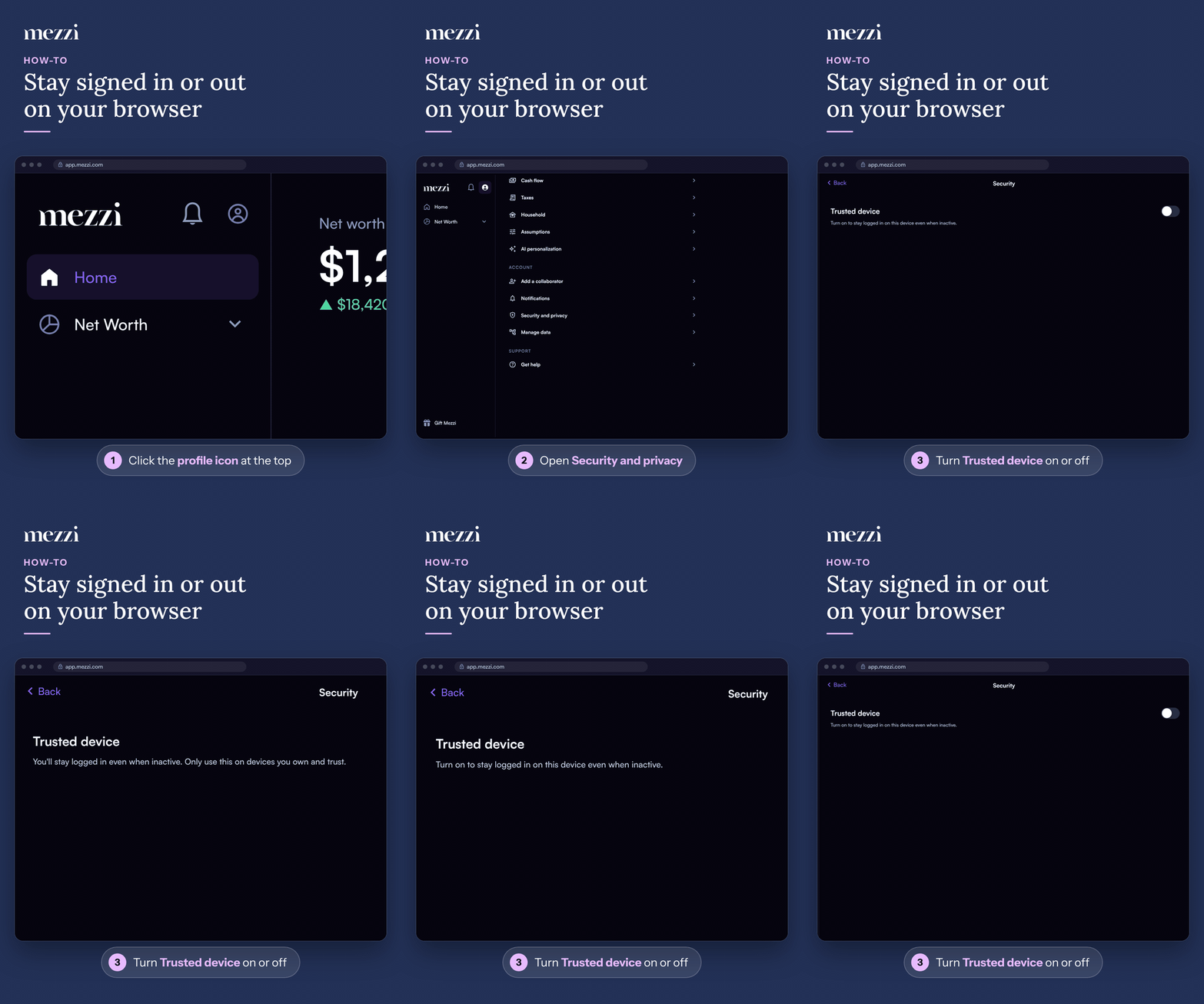
On the web, Mezzi signs you out automatically after 15 minutes of inactivity unless you've marked that browser as a Trusted device. You can turn Trusted device on or off yourself anytime under Profile > Security and privacy, and logging out always removes it, so your next visit starts at the sign-in screen.
📌 What You Need to Know
Automatic sign-out is the default, and it's deliberate. Mezzi holds a complete picture of your finances, so an unattended session on an untrusted browser ends on its own. After 10 minutes without activity you'll see a banner: "Still here? For your security, we'll log you out soon." If nothing happens by the 15-minute mark, you're signed out.
This applies to Mezzi on the web. The iOS and Android apps don't use automatic sign-out or the Trusted device setting.
Trust is per browser. Trusting the browser on your laptop doesn't trust any other computer or browser. Each one asks again.
Trusting a browser doesn't lower any other protection. Your accounts remain read-only, your connections are unchanged, and Mezzi still never holds your institution credentials. See Is My Data Secure?. A trusted device changes only whether inactivity signs you out.
🧭 How to Turn Trusted Device On or Off
Click the profile icon at the top of the left menu.
Open Security and privacy.
Turn Trusted device on to stay signed in on this browser, or off to be signed out after 15 minutes of inactivity.
You can also trust a browser in two other places:
When you sign in: turn on Stay signed in below the Sign in button.
From the inactivity banner: click Trust this device to avoid automatic logoff, then confirm with Trust this device.
🔒 How to Log Out
Click the profile icon, scroll to the bottom, and click Log out. Logging out also removes Trusted device from that browser, so you'll need to sign in next time.
Important Notes
Don't trust a shared computer. On a family computer, a work laptop or anything you don't solely control, leave Trusted device off and let automatic sign-out do its job.
Signing out doesn't disconnect your accounts. It only ends the session. Your connections, holdings and history are unaffected.
Privacy mode is the other half of this. Automatic sign-out protects an unattended session; privacy mode hides the numbers while you're actively using Mezzi in public. See How to Use Privacy Mode to Hide Your Balances.
🗨 Still Need Help?
If you're signed out on a browser you've trusted, or Trusted device won't stay on, email help@mezzi.com with your browser and roughly when it happens. You can also text or call (415) 763-6997.