How to Choose a Connection Option (Plaid, Finicity, or SnapTrade) When Linking an Account
Last updated: September 30, 2026
Overview
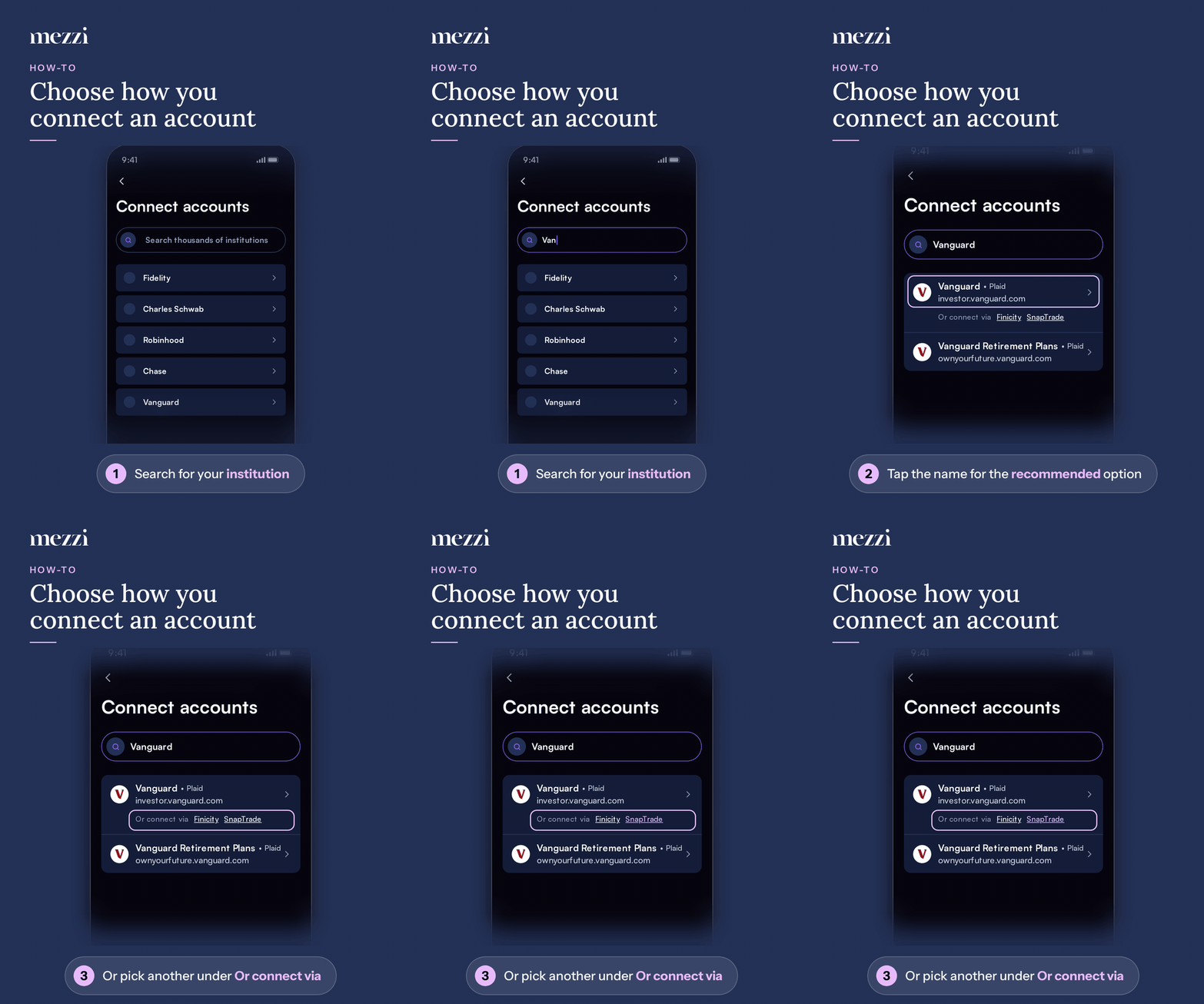
When you search for your bank or brokerage in Mezzi, each result shows the connection Mezzi recommends next to the institution's name (for example, Vanguard • Plaid). Some results also show Or connect via followed by other options, such as Finicity or SnapTrade. Tap the institution to use the recommended connection, or tap one of the other options if the recommended one didn't work for you before.
🧭 How to Connect Using a Different Option
Start adding an account and search for your institution by name.
Find the right result. The website address under the name tells apart institutions that share a name.
To use the recommended connection, tap the institution's name.
To use a different connection, tap one of the underlined names after Or connect via.
Sign in to your institution and finish connecting as usual.
If a connection fails or you cancel it, Mezzi also offers the other available options on the next screen, so you can try again without searching a second time.
💡 Why This Matters
Mezzi connects to institutions through several data providers, and a given institution can work better through one than another. The recommended option is the one that works most reliably for most people, so start there.
When to try another option:
The recommended connection failed or kept asking you to repair it.
Your account connected, but holdings or balances didn't come through.
Mezzi support suggested a specific option for your institution.
Important Notes
Not every institution has more than one option. If you don't see Or connect via, only one connection is available.
The popular brokers shown before you search don't list other options. Search for the institution by name to see them.
Don't connect the same accounts through two different options. That creates duplicate accounts. If it happens, see How to Remove Duplicate Accounts in Mezzi.
If a connection already exists and has stopped syncing, repair it rather than adding it again. See How to Repair a Broken Account Connection.
🗨 Still Need Help?
Email help@mezzi.com with your institution's name, which options you tried, and a screenshot of any error.