How to Add Fixed Income Assets in Mezzi
Last updated: October 29, 2026
Overview
If you cannot connect your brokerage account, you can manually add fixed income assets in Mezzi. This feature lets you include bonds, CDs, Treasuries, annuities, gold, silver, and other non-linked assets, ensuring your complete financial portfolio is accurate and up to date.
An asset without a searchable ticker, such as an individual bond, CD, or Treasury, is added through Can't find my ticker, where you enter its name and prices yourself. Bond funds and ETFs with a ticker can be searched and added like any other holding.
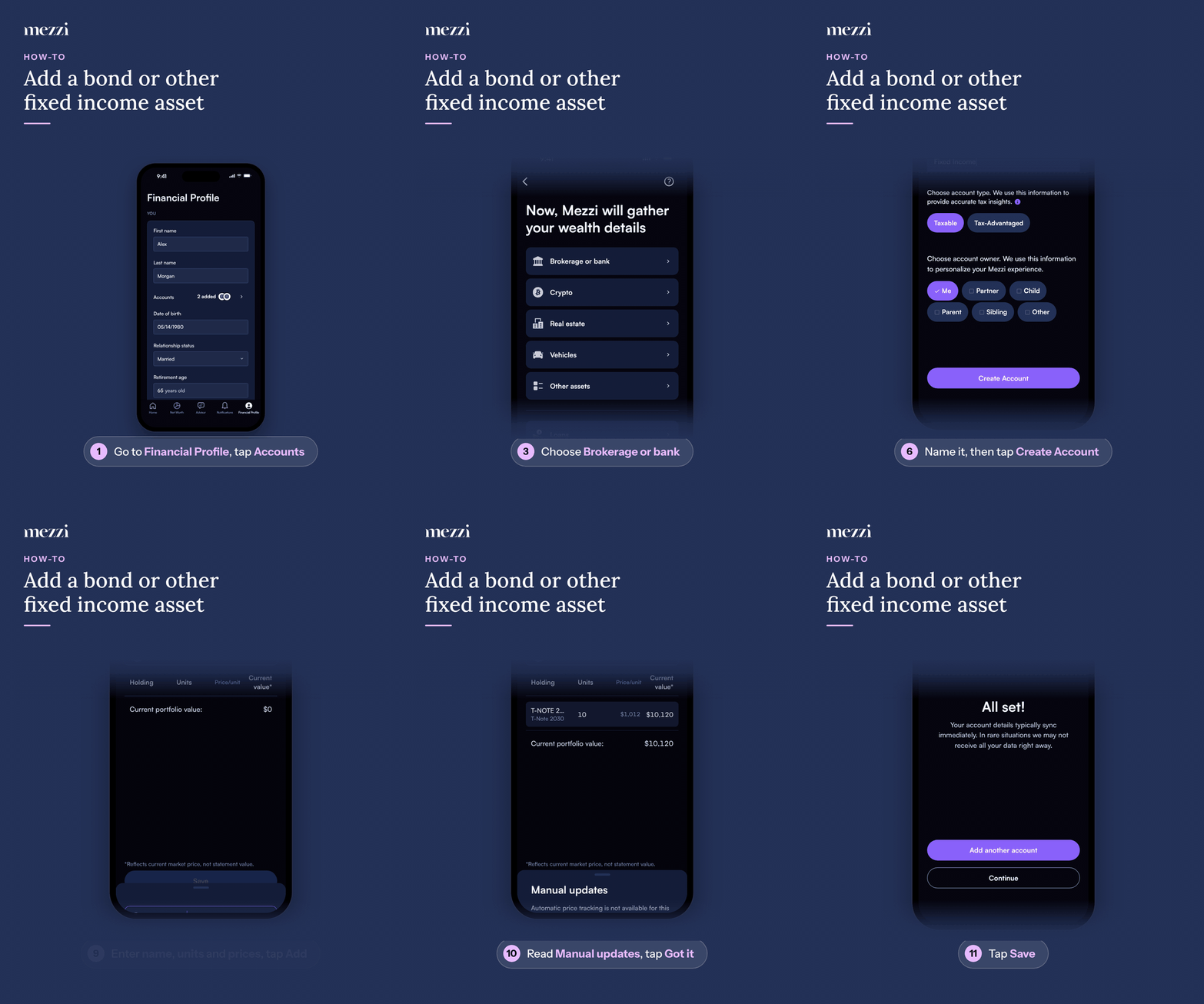
🧭 How to Add a Fixed Income Asset (iOS)
Tap Financial Profile, the last tab in the bottom bar, then tap Accounts in the You section. If you haven't added any accounts yet, this takes you straight to the add-account options (step 3).
Tap Connect new account.
Choose Brokerage or bank.
Tap Add manually.
Tap Create new account.
Give the account a name (for example, "Treasury bonds"), choose the account type and owner, and tap Create Account.
Tap Add holdings.
Search for the asset. If it has no ticker in the results, tap Can't find my ticker at the bottom of the list.
Enter the Asset name, Units, Buy price, Current price, and Date, then tap Add.
A Manual updates notice explains that Mezzi can't track this asset's price automatically. Tap Got it, or Don't show again to stop seeing it.
Tap Save.
🧭 How to Add a Fixed Income Asset (web)
Click Financial Profile in the left menu.
Click Accounts in the You section. If you haven't added any accounts yet, this takes you straight to the add-account options (step 4).
Click Connect new account.
Choose Brokerage or bank.
Click Add manually.
Click Create new account.
Give the account a name (for example, "Treasury bonds"), choose the account type and owner, and click Create Account.
Click Add holdings.
Search for the asset. If it has no ticker in the results, click Can't find my ticker at the bottom of the list.
Enter the Asset name, Units, Buy price, Current price, and Date, then click Add.
A Manual updates notice explains that Mezzi can't track this asset's price automatically. Click Got it, or Don't show again to stop seeing it.
Click Save.
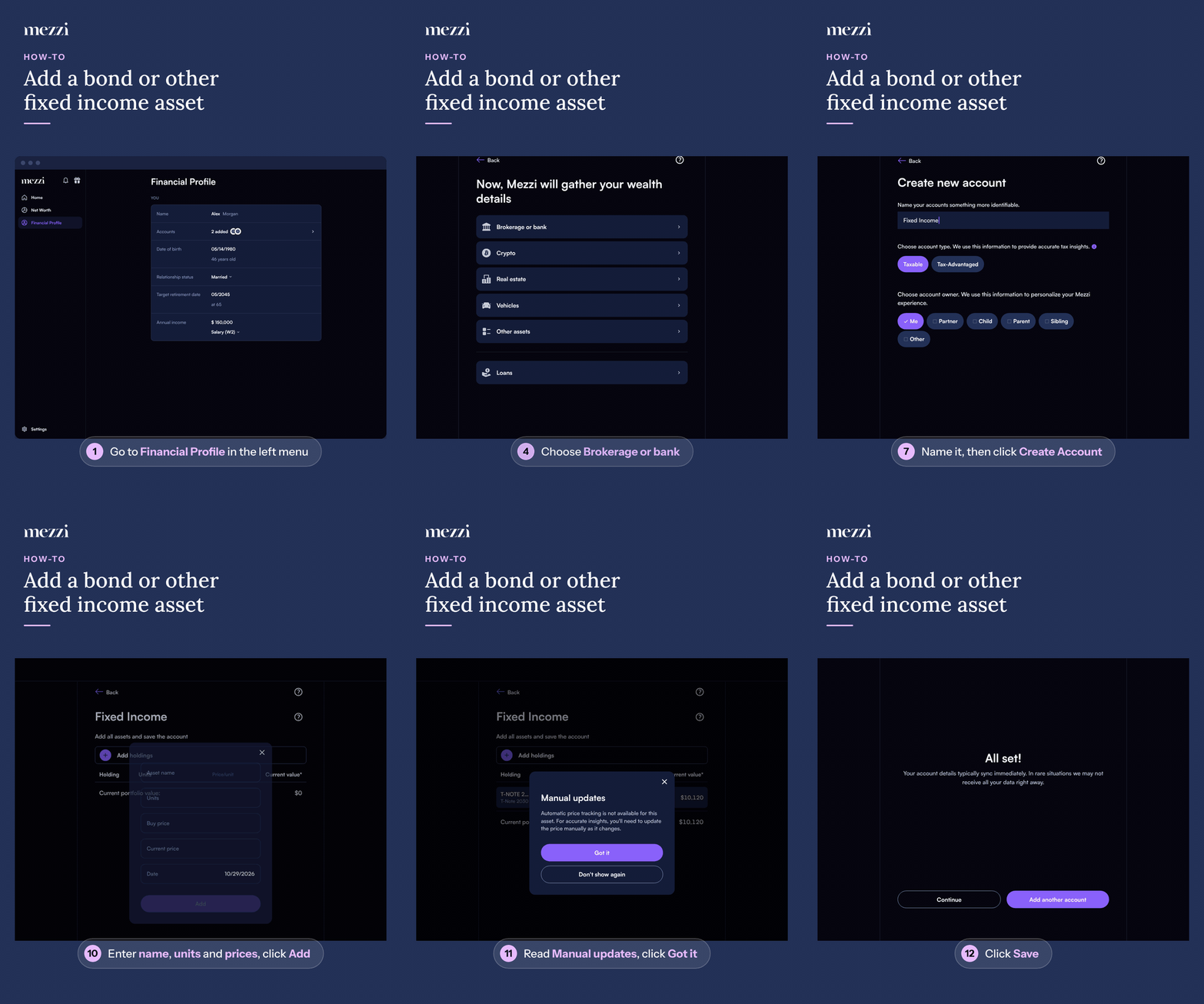
Once you see All set!, the asset is added to the new account and included in your Net Worth.
Bond Funds and ETFs
Bond funds and ETFs that have a ticker (for example, BND) don't need Can't find my ticker. Search for the ticker, select it, enter the Units and Buy price, and Mezzi tracks its price automatically.
Adding to an account you already created: after Add manually, select that account on the Choose account screen instead of choosing Create new account.
💡 Why Manual Entry Matters
Manually entering fixed income and other non-linked assets ensures they are included in your overall financial profile. This enables Mezzi's AI to provide more accurate, personalized insights tailored to your complete wealth picture.
You can also add notes under AI personalization on the Financial Profile tab, such as:
“This fixed income account is designated for my children's inheritance.”
This context helps guide AI-driven advice that aligns with both your financial data and your goals.
Important Notes
Manually added fixed income assets do not automatically sync balances.
Automatic price tracking is unavailable without an associated ticker symbol, so update the current price yourself as it changes. See How to Edit Holdings for Manually Added Accounts in Mezzi.
You can update the tax status of assets at any time.
Stocks and ETFs with tickers, including bond ETFs, track market prices automatically.
Cryptocurrency isn't a fixed income asset and has its own account type. To add it, choose Crypto instead of Brokerage or bank.
🗨 Still Need Help?
If you are unable to add your fixed income asset or it does not appear after saving, please contact help@mezzi.com for assistance with setup.