How to Fix Incorrect Account Tax Status in Mezzi
Last updated: October 29, 2026
Overview
If Mezzi AI treats an account as tax-advantaged when it isn't, or the other way around, update that account's tax status in your Financial Profile. Mezzi AI reads each account's tax status directly from your Financial Profile. Once you correct it, it stays corrected: refreshing the connection no longer overwrites a status you've set. Accounts your institution doesn't classify start as Taxable.
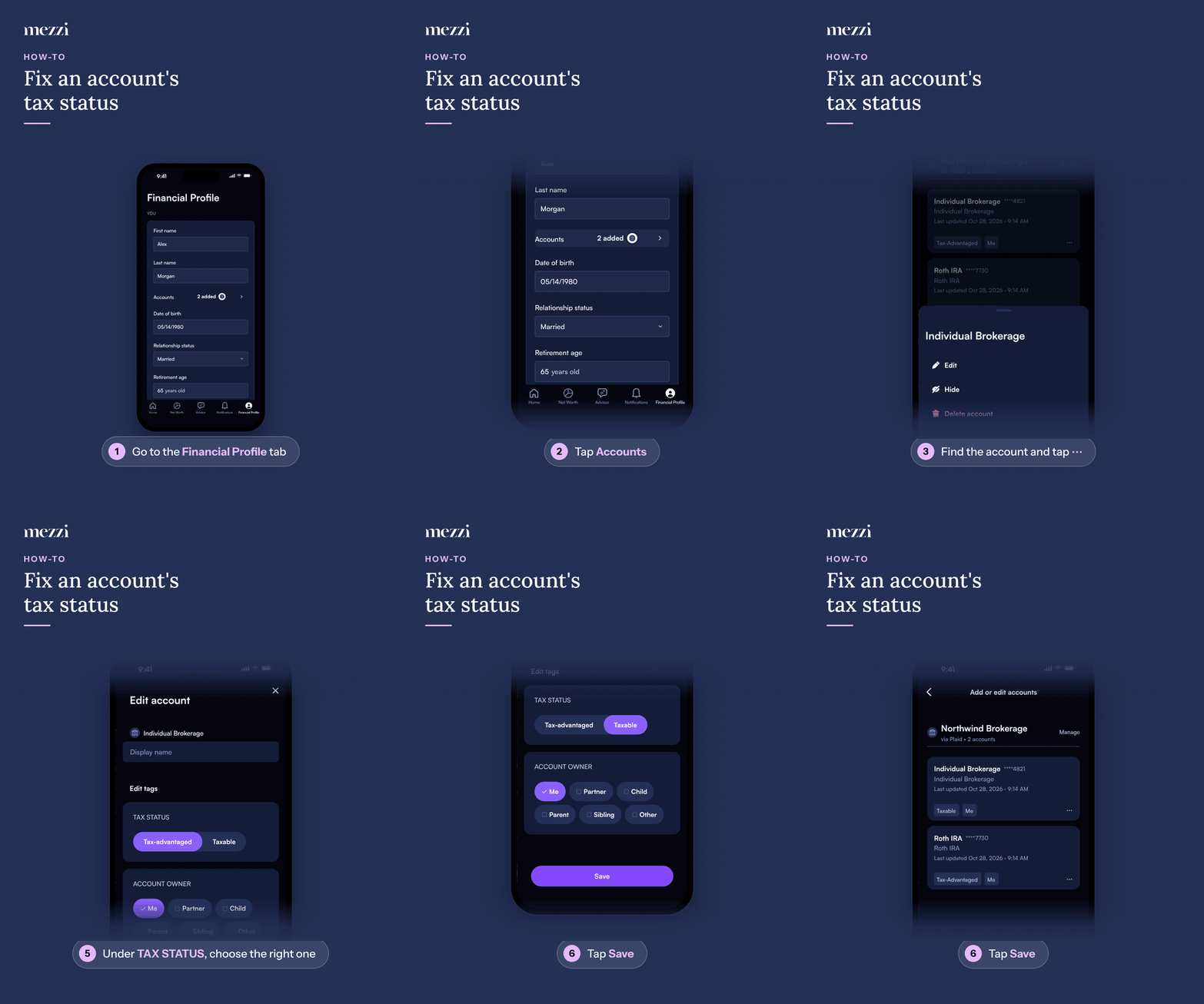
🧭 How to Update Your Account Tax Status (iOS)
Tap Financial Profile, the last tab in the bottom bar.
Tap Accounts in the You section. This opens Add or edit accounts.
Find the account you want to update and tap the three dots (⋯) next to it.
Select Edit.
On Edit account, under TAX STATUS, choose Tax-advantaged or Taxable.
Tap Save.
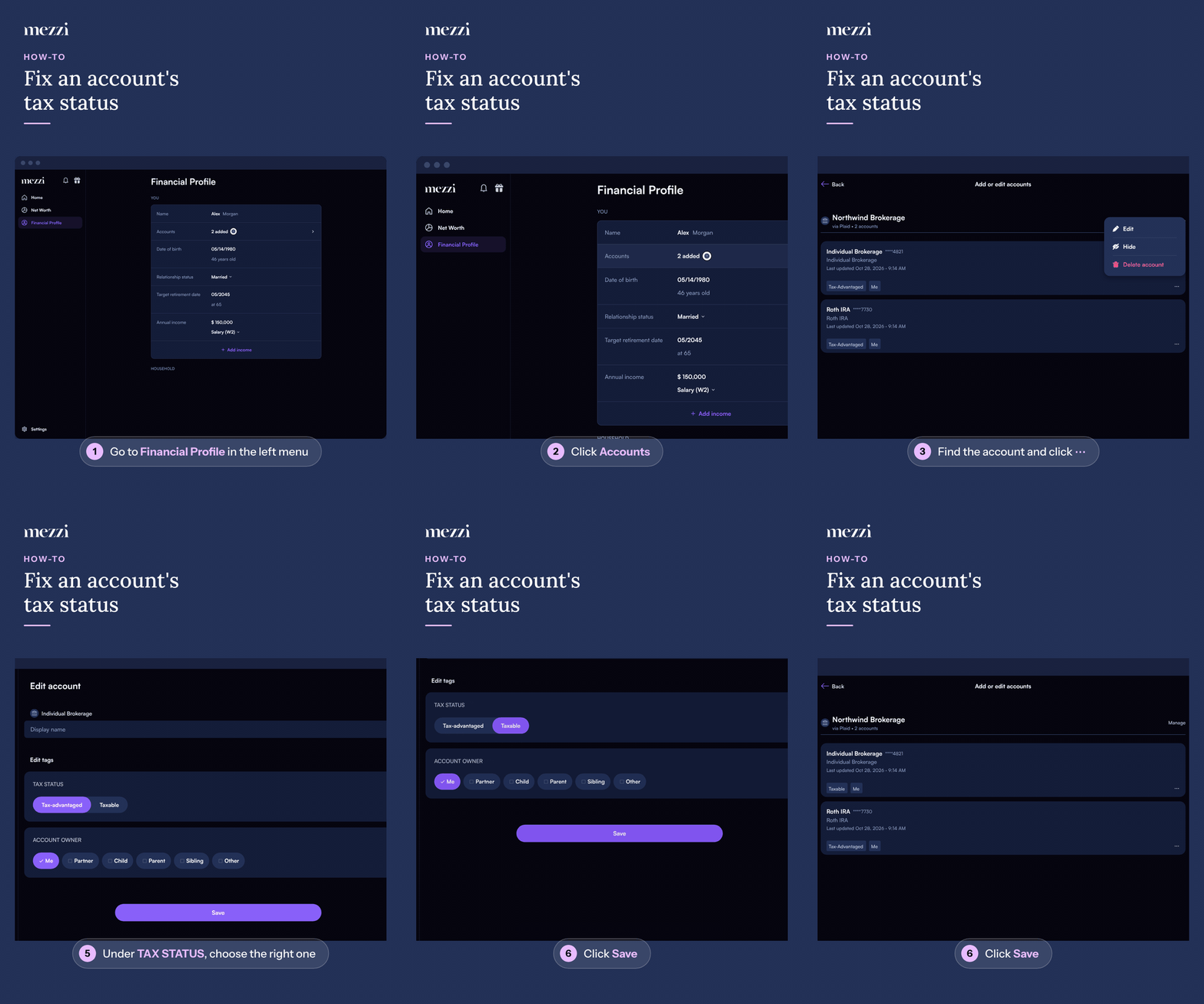
🧭 How to Update Your Account Tax Status (web)
Click Financial Profile in the left menu.
Click Accounts in the You section. This opens Add or edit accounts.
Find the account you want to update and click the three dots (⋯) next to it.
Select Edit.
On Edit account, under TAX STATUS, choose Tax-advantaged or Taxable.
Click Save.
Repeat these steps for each account that has the wrong tax status.
💡 Why This Matters
Mezzi AI uses each account's tax status to generate personalized insights, like how much you hold in tax-advantaged accounts or where to place a trade. If an account is tagged wrong, the AI can misclassify it in summaries or suggest tax moves that don't apply to you.
Important Notes
New accounts start as Taxable when your institution doesn't tell Mezzi what type of account it is. If it's actually an IRA, 401(k), HSA, or other tax-advantaged account, update it with the steps above.
Your changes stick. When you set a tax status yourself, refreshing or reconnecting the account won't change it back.
Start a new chat after updating. A conversation that was already open may still reflect the old status.
Each account has to be updated individually.
Common Questions
Why is Mezzi AI calling my account tax-advantaged when it isn't?
The AI reads the tax status on each account in your Financial Profile. Update the tag under Financial Profile > Accounts > ⋯ > Edit, then start a new chat.
Why did my account show as Taxable when I connected it?
Your institution didn't identify the account type, so Mezzi set it to Taxable. Change it to the correct status and it will stay that way.
Will updating the tax status change my historical data?
It changes how the account is treated in AI answers and insights going forward. For questions about past reports, email help@mezzi.com.
🗨 Still Need Help?
If you've updated the tax status and Mezzi AI still classifies the account incorrectly in a new chat, email help@mezzi.com with:
The name of each affected account
The tax status you expect for each
A screenshot of the account settings and the AI answer