How to Manually Add an Account in Mezzi
Last updated: October 29, 2026
Overview
Easily add new accounts in Mezzi by connecting to an institution or entering them manually. Manual account entry ensures your complete financial portfolio is accurate, comprehensive, and up-to-date for better financial management.
To add an account manually, create a new brokerage or bank account, then add each holding by its ticker with the number of units and your buy price.
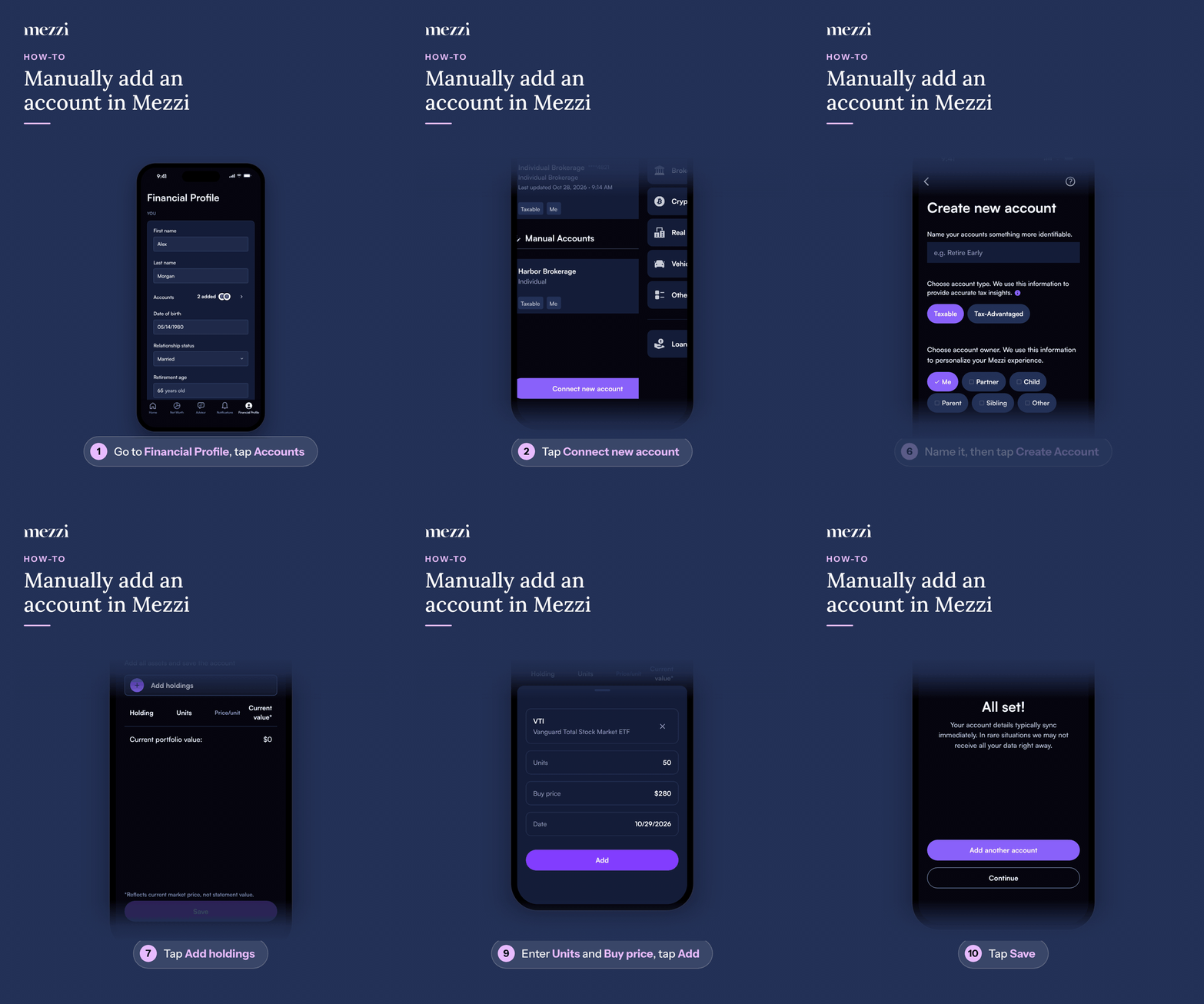
🧭 How to Manually Add an Account (iOS)
Tap Financial Profile, the last tab in the bottom bar, then tap Accounts in the You section. If you haven't added any accounts yet, this takes you straight to the add-account options (step 3).
Tap Connect new account.
Choose Brokerage or bank.
Tap Add manually.
Tap Create new account.
Give the account a name, choose the account type and owner, and tap Create Account.
Tap Add holdings.
Search for the ticker (for example, VTI) and select it.
Enter the Units and Buy price (and the Date, if needed), then tap Add.
Tap Save.
🧭 How to Manually Add an Account (web)
Click Financial Profile in the left menu.
Click Accounts in the You section. If you haven't added any accounts yet, this takes you straight to the add-account options (step 4).
Click Connect new account.
Choose Brokerage or bank.
Click Add manually.
Click Create new account.
Give the account a name, choose the account type and owner, and click Create Account.
Click Add holdings.
Search for the ticker (for example, VTI) and select it.
Enter the Units and Buy price (and the Date, if needed), then click Add.
Click Save.
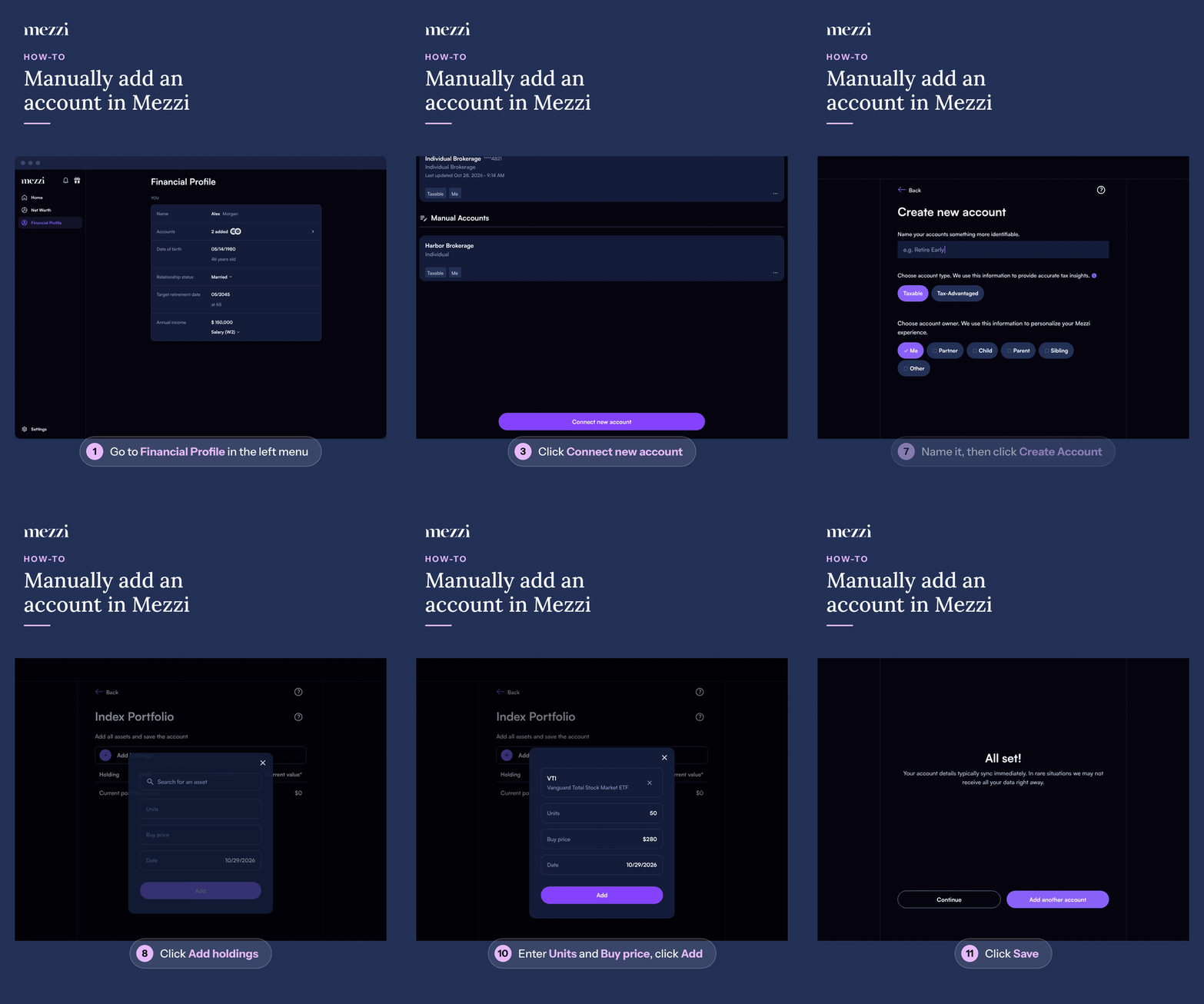
Shortcut: in the left menu, hover over Net Worth and click the + next to it to go straight to step 4.
Once you see All set!, your new account is added. It's listed under Manual Accounts in Financial Profile > Accounts and included in your Net Worth. To add more than one holding, repeat Add holdings, search, and Add for each one before you tap or click Save.
Other Ways to Add an Account Manually
On the Add brokerage or bank screen, you can choose AI document scan (web) or Upload brokerage statement (iOS) instead of Add manually. Upload a PDF or CSV file, and Mezzi's AI will automatically extract and populate your account details.
CSV Upload Requirements
When uploading CSV files with broker data, follow these formatting requirements:
One account per file – Each account must be in a separate CSV file. If you have multiple accounts in one spreadsheet, separate them into individual files before uploading.
Transaction type terminology – Use specific terms like “Buy” and “Sell” for transaction types. You may need to modify your spreadsheet columns to match these expected terms.
Include ticker symbols – Confirm and include ticker symbols for each fund to ensure proper tracking with live prices.
Exclude capital gains distributions – The platform does not currently support importing capital gains distributions. Only include buy and sell transactions in your import file.
Tip: If you have difficulty formatting or uploading broker data yourself, you can send your statement or spreadsheet to help@mezzi.com and we will upload it for you. Having support upload files is slower, as it requires an engineer, while uploading properly formatted files yourself is faster.
Adding Cash Holdings
To add cash, follow the same steps, but at the search step search for the currency code (for example, USD for US dollars), select it, enter the amount, and save.
💡 Why Manual Entry Matters
Manual entry allows you to include all assets and accounts, including those not linked digitally. This ensures Mezzi delivers personalized financial insights based on your complete data. Manual entry is especially useful for:
Private investments
Real estate holdings
Insurance policies
Unsupported brokerage accounts
Accounts that connect but show incomplete data (e.g., investments appearing as cash, missing underlying holdings)
Cash assets
Important Notes
Manual accounts do not sync balances automatically.
You must update balances manually if no ticker symbol is available. See How to Edit Holdings for Manually Added Accounts in Mezzi.
Market prices update automatically when tickers are included.
🗨 Still Need Help?
If you encounter any issues while adding or editing an account, contact help@mezzi.com and our support team will assist you through the setup process.