Troubleshooting Account Connection Issues
Last updated: October 29, 2026
Overview
If you encounter error messages such as:
“We’re unable to establish a connection to your financial institution. Try again later. (102)”
“Failed connection.”
“Institution not supported.”
Don’t worry — Mezzi offers alternative connection methods. We partner with three leading data aggregators: Plaid, Finicity, and SnapTrade.
This means if one connection method fails, you can use another to successfully link your account.
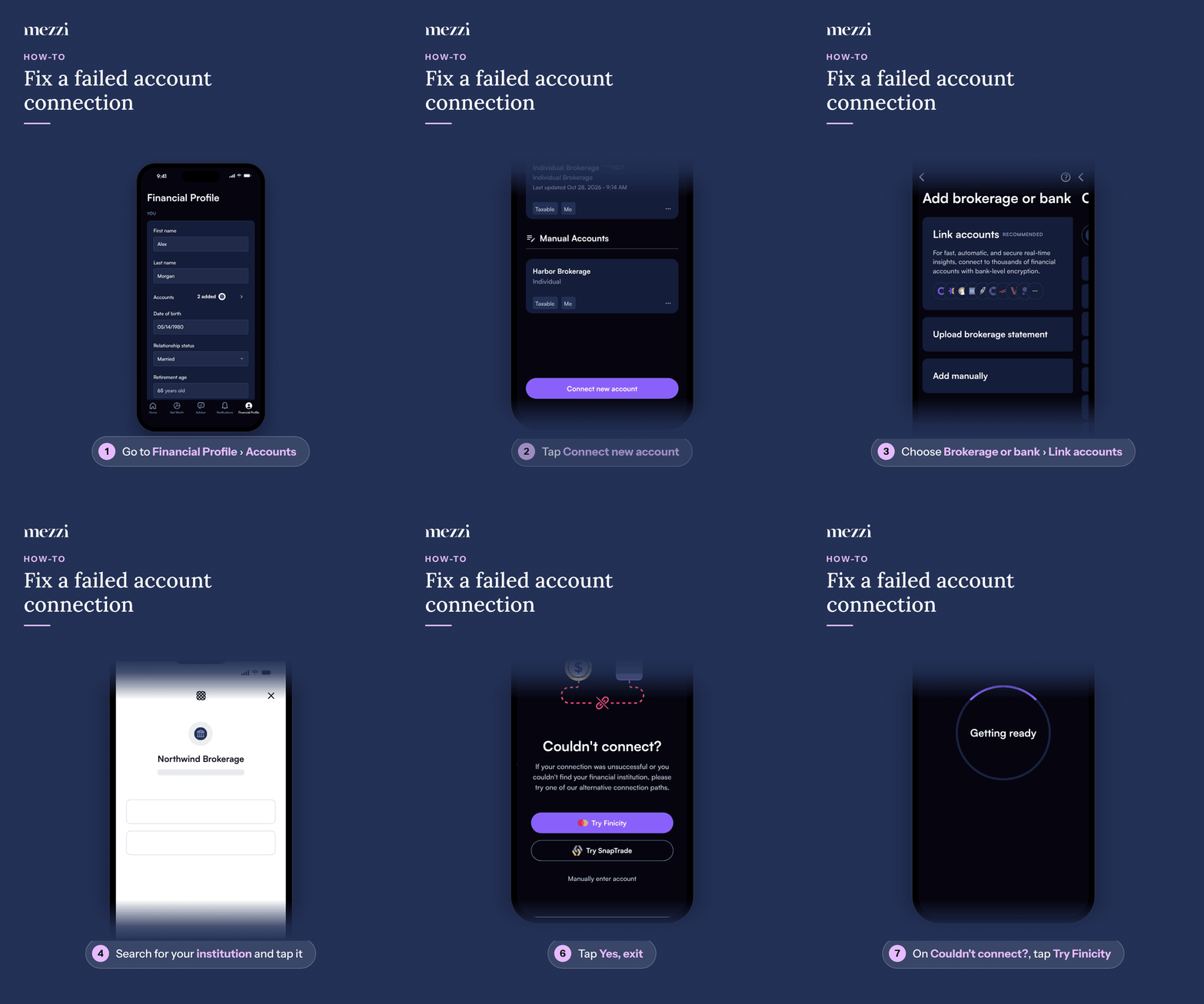
🧭 How to Connect via an Alternative Path (iOS)
Tap Financial Profile, the last tab in the bottom bar, then tap Accounts in the You section. This opens Add or edit accounts.
Tap Connect new account at the bottom of Add or edit accounts.
Choose Brokerage or bank, then tap Link accounts.
Search for your institution in Search thousands of institutions and tap it.
If the connection fails, close the provider window (for example, Plaid) by tapping the X in the top-right corner.
Tap Yes, exit at the bottom of the screen.
On the Couldn’t connect? screen, tap Try followed by another provider’s name (for example, Try Finicity).
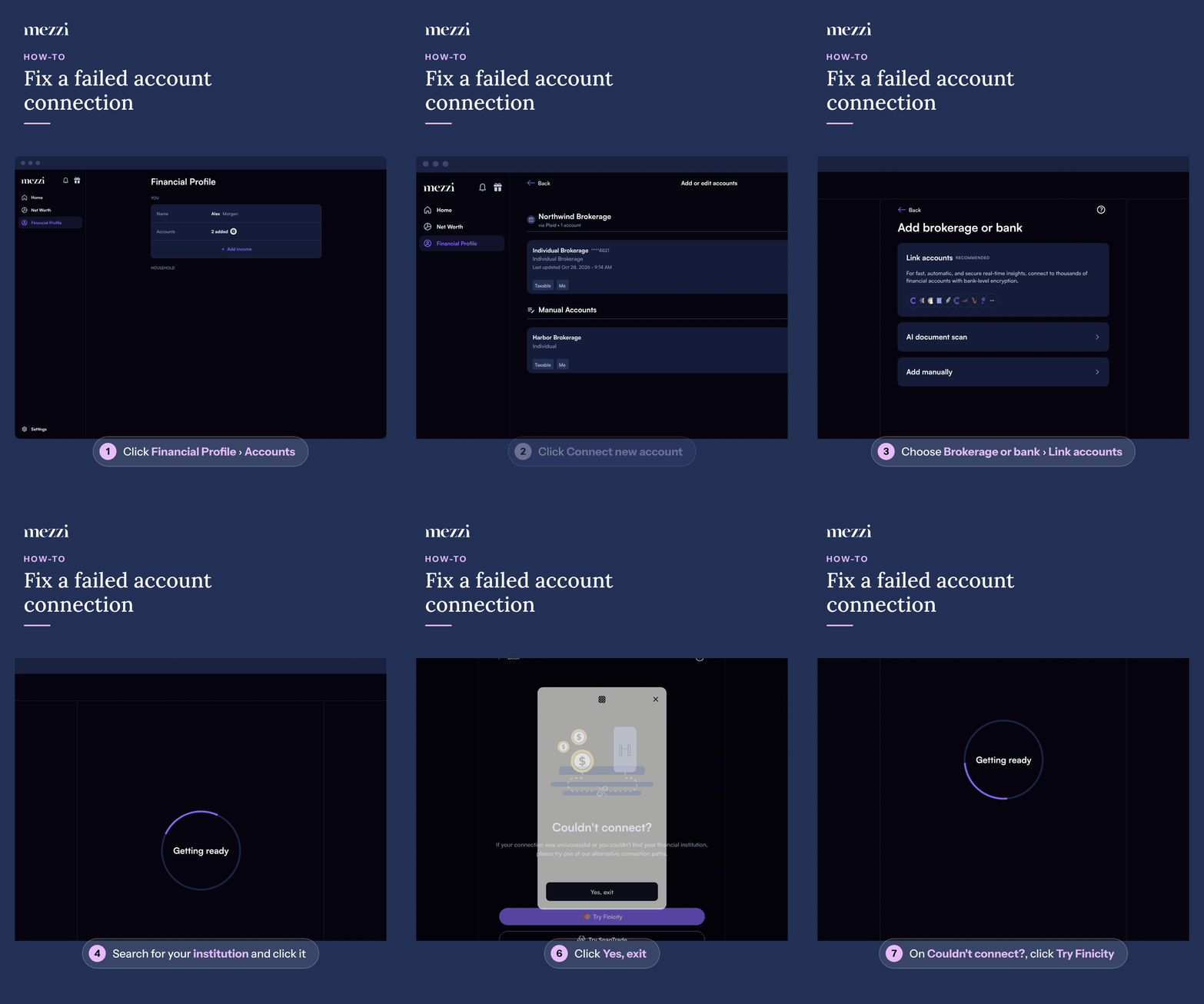
🧭 How to Connect via an Alternative Path (web)
Click Financial Profile in the left menu, then click Accounts in the You section. This opens Add or edit accounts.
Click Connect new account at the bottom of Add or edit accounts.
Choose Brokerage or bank, then click Link accounts.
Search for your institution in Search thousands of institutions and click it.
If the connection fails, close the provider window (for example, Plaid) by clicking the X in the top-right corner.
Click Yes, exit at the bottom of the window.
On the Couldn’t connect? screen, click Try followed by another provider’s name (for example, Try Finicity).
✅ Mezzi will route you to the provider you picked, such as SnapTrade or Finicity, to complete your account connection.
Tips
Shortest path: if your institution’s search result shows Or connect via followed by other providers, tap or click one of those underlined provider names to connect through it straight away.
No alternative available? The Couldn’t connect? screen also offers Manually enter account. If no other provider supports your institution, you’ll see Retry instead of a Try button.
Other ways to start: you can also use Add account in Settings (the gear at the top right of Home on iOS, or at the bottom of the left menu on web), or the + (Add account) next to Net Worth in the web left menu. These skip Add or edit accounts, so you start the connection right away.
💡 Why This Happens
Connection issues can occur due to:
The institution is not supported by one of our data partners.
The brokerage blocks third-party integrations.
The institution recently updated its login system or multi-factor authentication (MFA) requirements.
We are continuously expanding our coverage to support more institutions.
🗨 Still Need Help?
Email help@mezzi.com with:
The institution name and the URL you use to log in.
The type of account (e.g., 401k, IRA, brokerage).