How to Move Your Financial Context from ChatGPT, Claude, Gemini, or Other AI Tools to Mezzi
Last updated: October 29, 2026
Overview
If you've spent time talking with ChatGPT, Claude, Gemini, or another AI tool about your financial goals, investment preferences, risk tolerance, or future plans, you can bring that context into Mezzi.
Mezzi already understands the accounts and holdings you've connected. Adding your existing financial context helps Mezzi understand the person behind the portfolio, including what you're working toward, how you think about investing, and what matters to you, so your AI insights and guidance can be more personalized from the start.
This brings over your goals and preferences, not account numbers, balances, or holdings, and the prompt only surfaces what you've already shared with your AI tool.
Start by opening ChatGPT, Claude, Gemini, or another AI tool and pasting in this prompt:
Pull together what you know about me as an investor, based only on things I've actually told you or that you've saved to memory. Don't guess or fill gaps — if you don't know something, leave it out.
Cover these, and only where I've genuinely shared them:
Goals: What I'm saving or investing toward, with any timing or target amounts I've mentioned (retirement age, a home, kids' education, a big purchase, leaving work early, etc.).
Risk & philosophy: How I think about risk and volatility, my time horizon, and how hands-on I like to be (passive vs. active, DIY vs. advisor-led).
Values & no-gos: Anything I've said I care about in how I invest, and anything I refuse to invest in.
Life context: Anything about my family, work, or plans that shapes how I think about money.
How I like to engage: My preferences for detail, tone, or format when we talk about finances.
Format it as short bullets under each heading. Keep my own wording where you can. If a section is empty because I never discussed it, just write “nothing on file” and move on.
Review the response and make sure you're comfortable with the information you want to bring into Mezzi, then copy it and add it to AI personalization using the steps below.
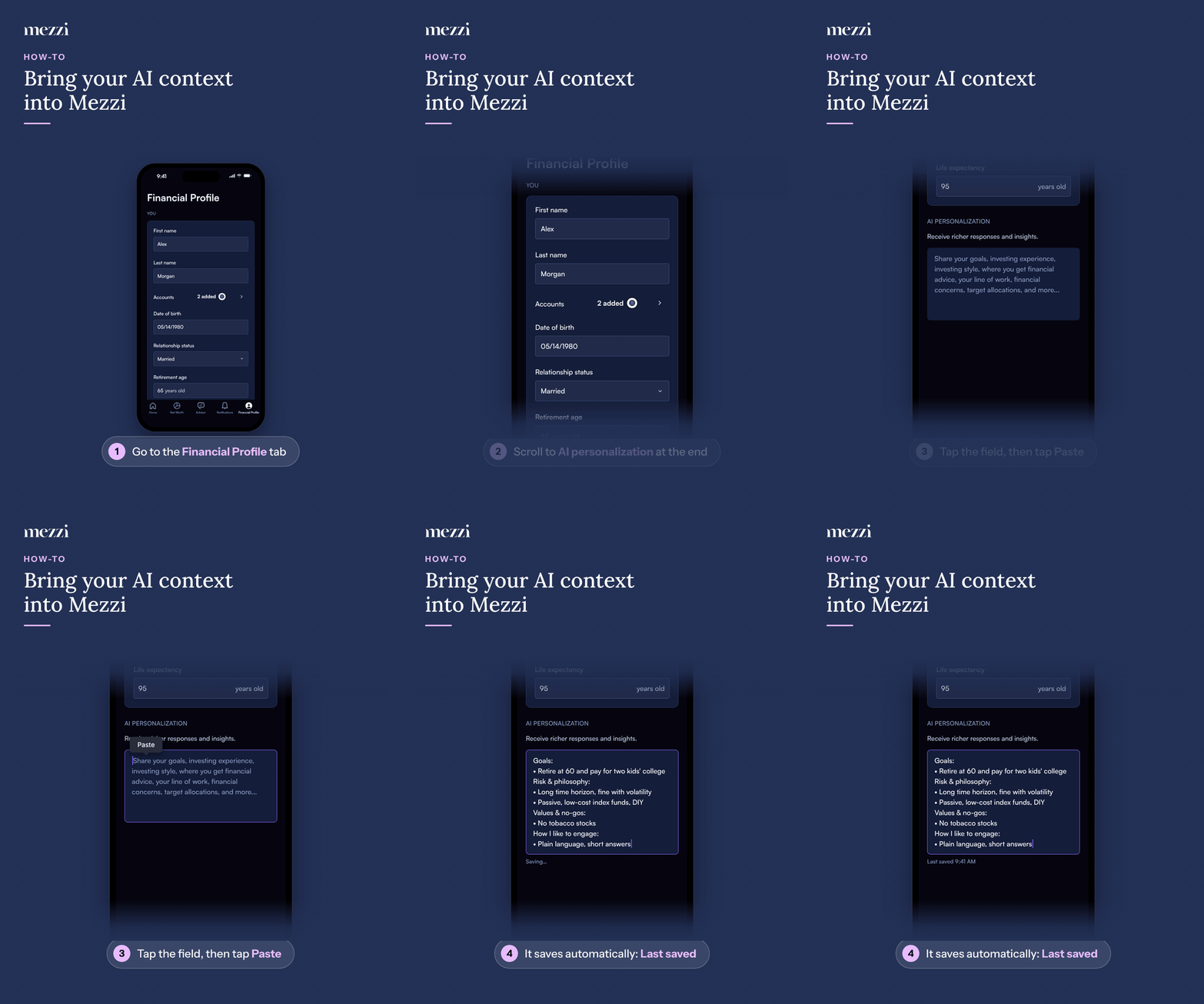
🧭 How to Bring Your Financial Context into Mezzi (iOS)
Tap Financial Profile, the last tab in the bottom bar.
Scroll to AI personalization, the last section on the page.
Tap the text field, then tap Paste in the bubble that appears.
It saves automatically: you'll see Saving… and then Last saved. There's no Save button.
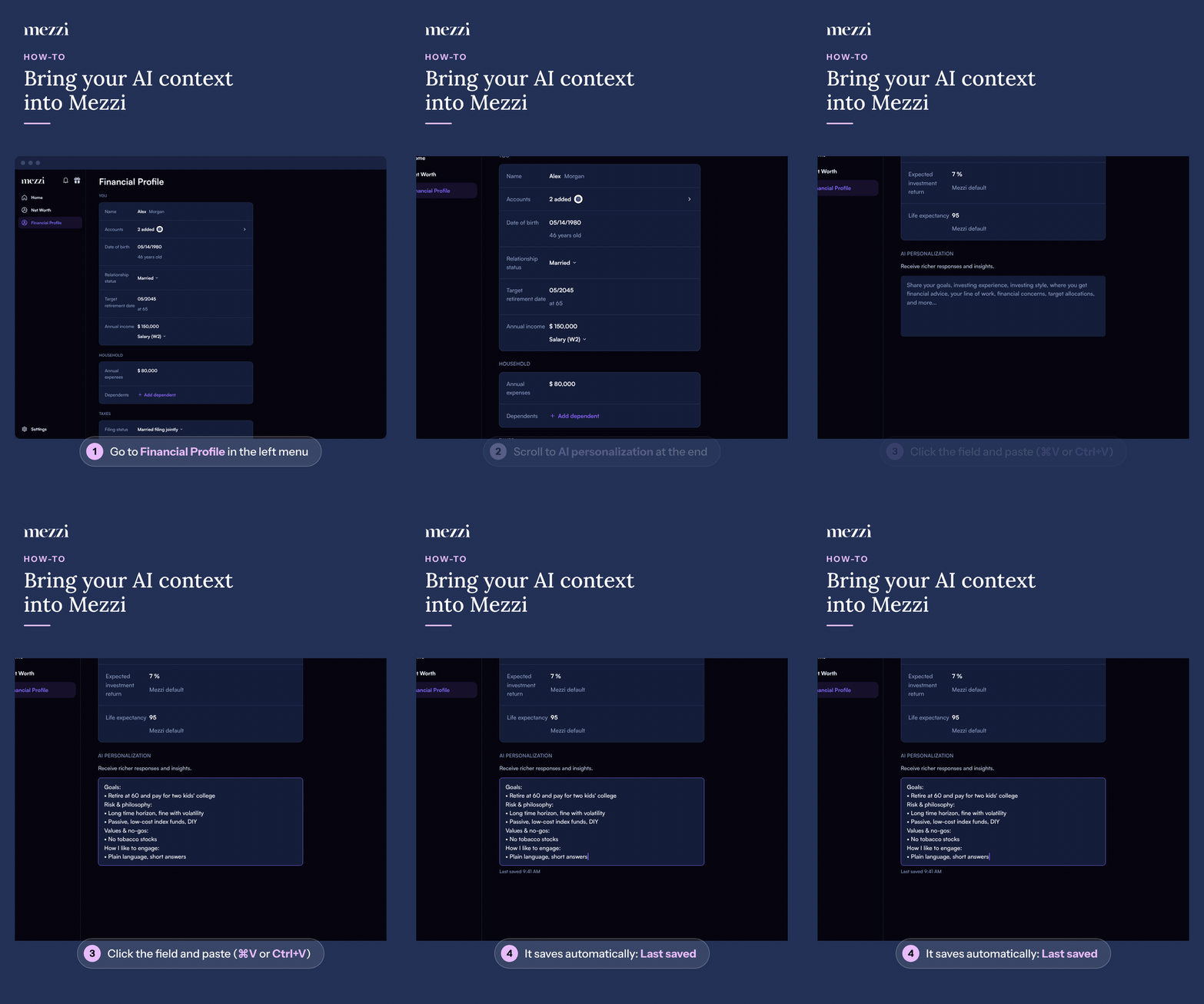
🧭 How to Bring Your Financial Context into Mezzi (web)
Click Financial Profile in the left menu.
Scroll to AI personalization, the last section on the page.
Click the text field and paste with ⌘V (Mac) or Ctrl+V (Windows).
It saves automatically: you'll see Saving… and then Last saved. There's no Save button.
Mezzi can now use this additional context to personalize your analysis, insights, and AI conversations moving forward.
💡 Why This Matters
Your portfolio tells Mezzi what you own. AI personalization helps Mezzi understand why you own it and what you're trying to accomplish.
That context can include:
Financial and investment goals
Retirement plans and timelines
Risk tolerance and investment philosophy
Preferences for active or passive investing
Values or investments you want to avoid
Family, career, or life plans that affect your finances
How you prefer financial information to be explained
Bringing this context into Mezzi means you don't have to start from a blank slate after spending time thinking through these topics with another AI tool.
Mezzi can combine an understanding of your financial life and goals with the portfolio information you've connected to provide more personalized guidance.
Important Notes
This process brings over financial goals, preferences, and personal context, not your connected financial accounts, account numbers, balances, or holdings.
The prompt asks the AI tool to surface information you've previously shared with it or that it has saved to memory. It specifically instructs the AI not to guess or fill in missing information.
Always review the generated response before copying it into Mezzi. Remove anything that is incorrect, outdated, or that you don't want included in your AI personalization.
Only information you choose to copy and paste into Mezzi through this process is transferred.
🗨 Still Need Help?
If you have questions about adding your financial context or using AI personalization, email help@mezzi.com and we'll be happy to help. Once you've tried it, we'd also love to hear how it went.