How to Tell Mezzi About Details Your Accounts Don't Show (Rates, Extra Payments, Plans)
Last updated: October 30, 2026
Overview
When your connected accounts don't carry a detail you want Mezzi to know, such as a guaranteed interest rate, an extra mortgage payment or a stock you're watching, write it in AI Personalization in your Financial Profile, or in the Notes on the specific property, loan or asset. Advisor reads both, so its answers and insights take the detail into account.
🧭 How to Add a Detail to AI Personalization (iOS)
Tap Financial Profile, the last tab in the bottom bar.
Scroll to AI PERSONALIZATION.
Tap the text box and type the detail in plain words, for example "My whole life policy earns a 4.5% guaranteed rate."
Tap outside the box. Mezzi saves it automatically and shows Last saved with the time.

🧭 How to Add a Detail to AI Personalization (web)
Click Financial Profile in the left menu.
Scroll to AI PERSONALIZATION.
Click the text box and type the detail in plain words, for example "My whole life policy earns a 4.5% guaranteed rate."
Click outside the box. Mezzi saves it automatically and shows Last saved with the time.
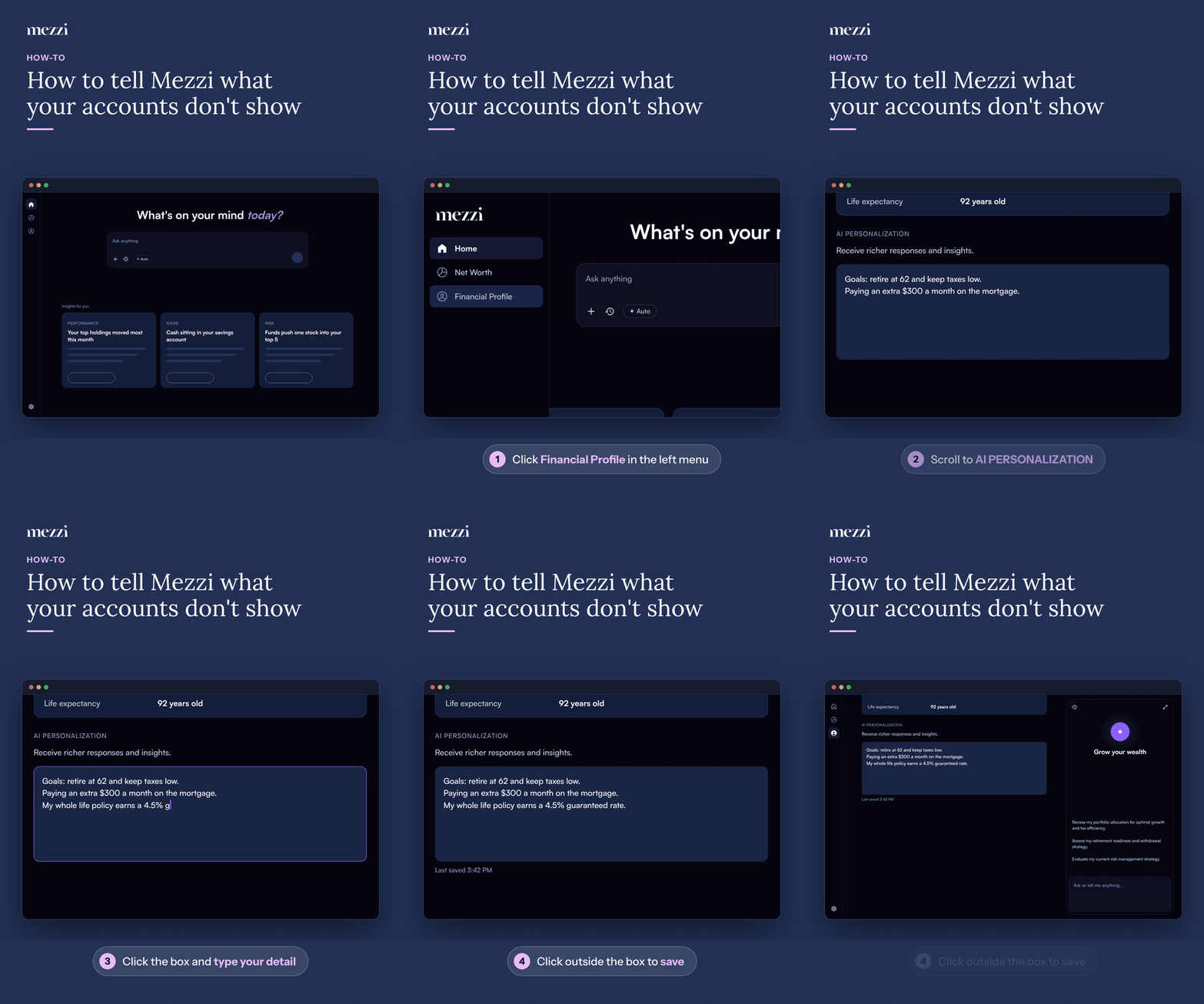
For a detail about one specific home, loan, vehicle or other asset you added, put it in that item's Notes instead. See how to add notes to a property or manually added asset.
💡 Why This Matters
Data aggregators send balances and holdings, but not everything that matters for advice. Common examples from members:
Paying extra on your mortgage: for a mortgage you added yourself, set Monthly payment to the full amount you pay, and add a note such as "Includes $300 a month of extra principal." See how to add a loan and its APR.
Interest rate on a connected mortgage or HELOC: connected loans don't always include the rate. Add it as a note on the property, for example "HELOC at 7.25% variable."
Guaranteed or fixed rates: life insurance cash value, annuities and CDs often come through without their rate. Add the rate to AI Personalization.
Stocks you're watching: list them in AI Personalization, for example "Watchlist: NVDA, AAPL, VOO," then ask Advisor about them.
Plans and preferences: a retirement date, an upcoming home purchase, or a fund you won't sell for tax reasons.
Then ask Advisor a question that uses it, for example "How much sooner will I pay off my mortgage with my extra payments?"
Important Notes
Write one detail per line so they're easy to update later.
Update or delete a detail when it changes, so Advisor isn't working from old information.
For more on what AI Personalization is for, see how to update AI Personalization.
🗨 Still Need Help?
If Advisor doesn't seem to use a detail you added, email help@mezzi.com with what you wrote, where you put it, and the question you asked.