How to Create, Change, and Delete Notifications in Mezzi
Last updated: October 23, 2026
Overview
Mezzi's notifications are created, changed, and deleted entirely through chat, in plain English — there's no separate setup screen. Describe what you want tracked, how, and how often, and Mezzi builds the alert to match. For alerts that measure a return from a specific past date, the one thing most likely to trip you up is asking for the notification before Mezzi has confirmed the starting figures — see the tip below for the fix.
🧭 How to Set Up a Notification
Where they live. Alerts are always created by asking Mezzi in Advisor (the Advisor tab in the bottom bar on mobile, or the chat panel on Home on web). The Notifications screen (a tab in the bottom bar on mobile, or the bell icon at the top of the left menu on web) shows the notifications you've received, but setting one up or changing it happens in chat, not through a form. In Settings › NOTIFICATIONS you'll find the Mobile and Email switches for how alerts reach you — by push notification and by email — but the alerts themselves are still created through chat.
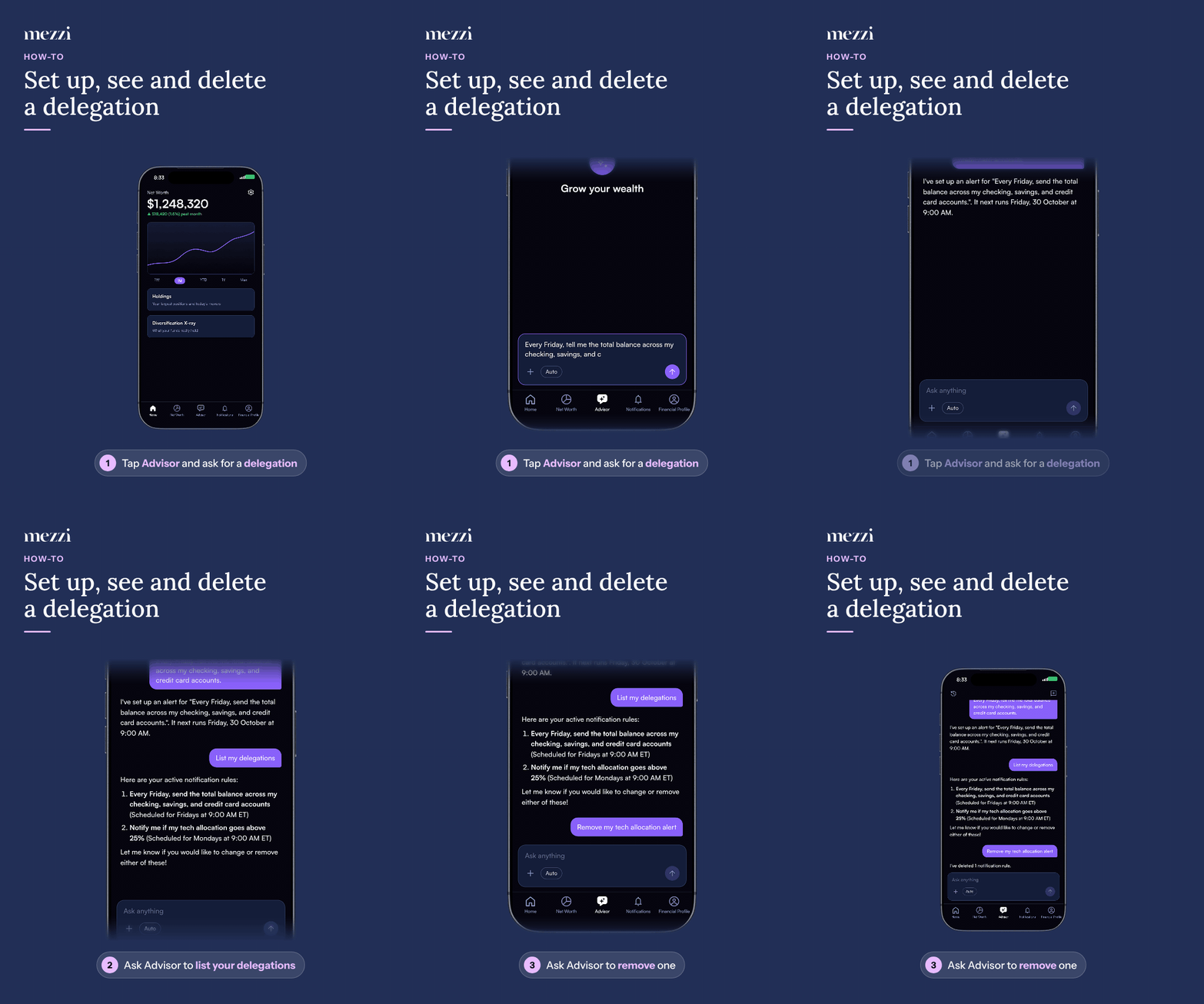
See what you already have. Ask: "What notification rules do I have?" Mezzi lists them back in plain language.
Create one. Just describe what you want. The more specific you are, the better the result. It helps to include:
What you want tracked — the exact tickers or accounts.
Whether it's a regular report or an alert with a trigger, for example "tell me when it drops below $X."
A starting date, if you want a return measured from a particular point.
How you want figures combined — a simple average across holdings, or weighted by position size.
How often, at what time, and in which timezone.
Change or remove one. There's no edit function, but you can simply ask. Say "Change my semiconductor notification to weekly instead of daily" and Mezzi will replace it. To remove one, say "Delete my notification about the semiconductor returns." To clear everything, "Delete all my notifications."
One thing worth knowing: if you ask for a new alert that's similar to an existing one without asking to change it, you'll end up with both, and two emails. Asking to change or delete is the reliable way.
💡 Why This Matters
Anchor date-based alerts to figures you've both already seen. When your alert measures a return from a past date, ask Mezzi for those prices first, in the same conversation, then ask for the notification. That way the alert is anchored to numbers you've both confirmed, rather than ones looked up later — which makes it far less likely to drift or read incorrectly.
Important Notes
Notification limits depend on your membership. If you're not sure how many you can create, ask Mezzi or check your plan details.
Delivery currently covers email and push notifications on iPhone.
The exact wording of the return period in each email (for example, "since July 29") is composed fresh each time a notification sends, rather than stored as a fixed value — so its phrasing can vary slightly send to send even when the tracked period itself hasn't changed. If the numbers themselves ever look wrong rather than just the wording, see Why Does My Notification Show a Different Start Date Than Before? or contact support.
🗨 Still Need Help?
Email help@mezzi.com with what you're trying to track and, if something's not behaving as expected, the exact wording of the notification and what you expected instead.