Account Showing Stale or Incorrect Data?
Last updated: October 29, 2026
Overview
If you notice any of the following issues with your account data:
Holdings have not updated recently
Balances appear outdated or inaccurate
Portfolio values do not match your brokerage statements
Accounts showing only cash (USD) instead of holdings
Don’t worry — most accounts refresh automatically every 24–48 hours. Delays are usually caused by temporary synchronization issues with our data partners. Mezzi allows you to manually trigger an update using Refresh connection or Repair all accounts.
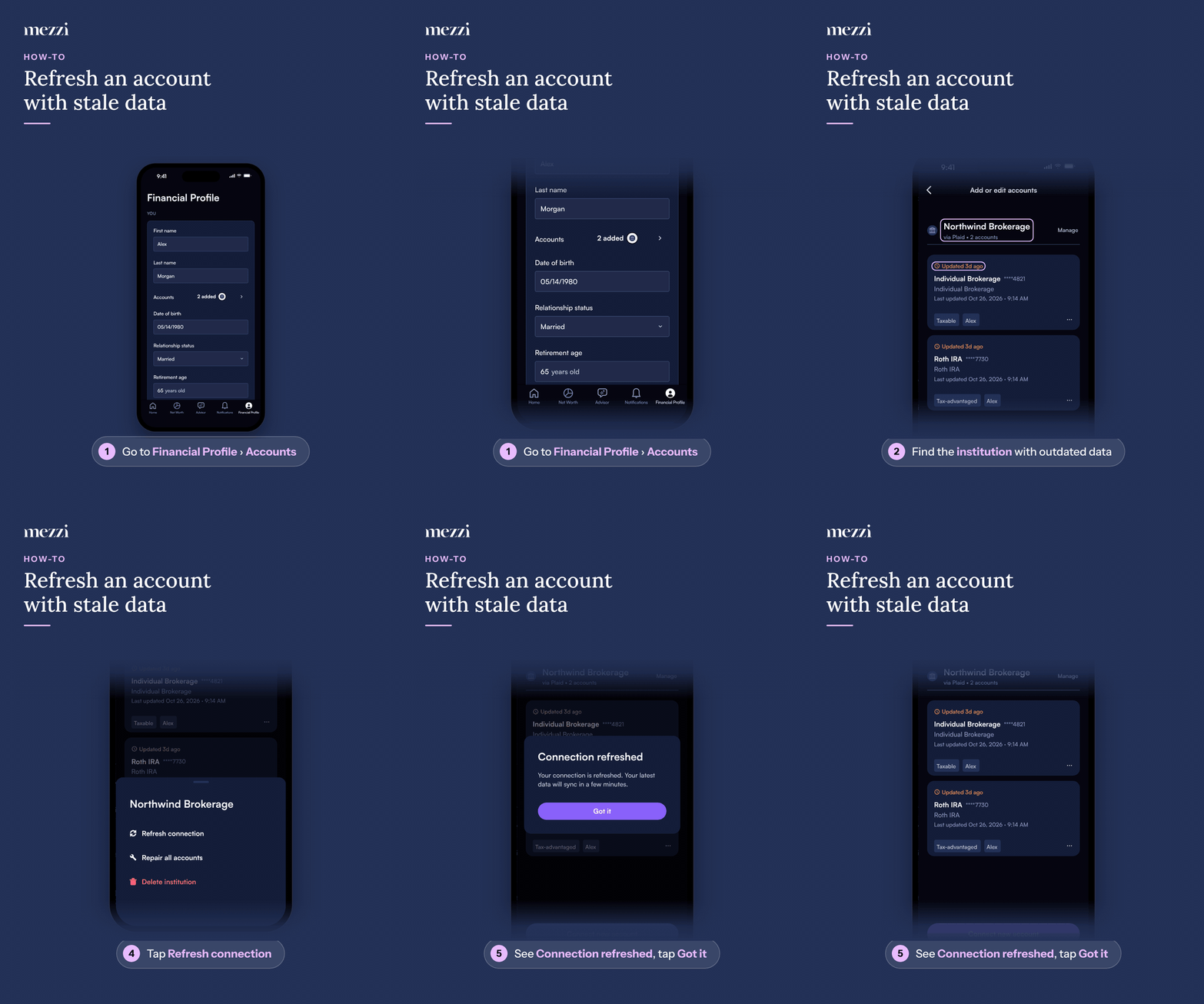
🧭 How to Refresh Your Account (iOS)
Tap Financial Profile, the last tab in the bottom bar, then tap Accounts in the You section. This opens Add or edit accounts.
Find the institution the affected account belongs to.
Tap Manage next to that institution. Its options open in a sheet at the bottom of the screen.
Tap Refresh connection.
When Connection refreshed appears, tap Got it.
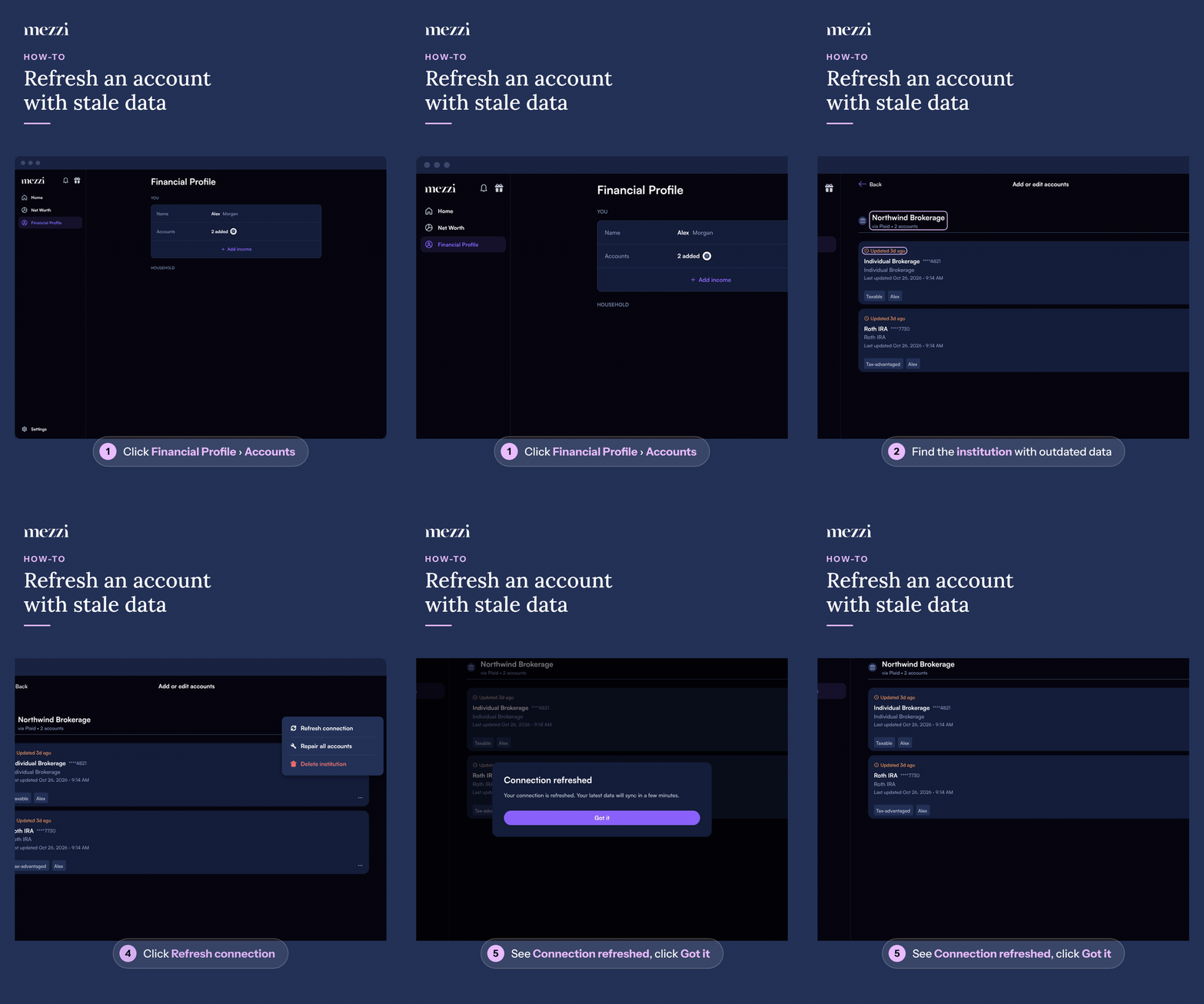
🧭 How to Refresh Your Account (web)
Click Financial Profile in the left menu, then click Accounts in the You section. This opens Add or edit accounts.
Find the institution the affected account belongs to.
Click Manage next to that institution. Its options open in a dropdown menu.
Click Refresh connection.
When Connection refreshed appears, click Got it.
The refresh runs in the background, so you won’t be asked to sign in again. Your latest data will sync in a few minutes. If not, please allow up to 24–48 hours for automatic synchronization. Some institutions don’t support on-demand refresh. If you see Refresh not supported, your data will update automatically when available.
Your Manage Options
Manage shows up to three options:
Refresh connection: Use this when your account is connected but you are waiting for the latest activity to appear. After you use it, it’s unavailable for about an hour (it appears greyed out with the time left). It’s also unavailable while the connection needs repair.
Repair all accounts: Use this option when the connection is broken or the data feed has stopped updating. It reopens the provider’s window so you can sign in to your institution again. This option only appears when the connection can be repaired.
Delete institution: Removes the whole institution and all of its accounts from Mezzi, typically when the institution appears duplicated.
If your account still shows as cash after 24 hours: Use Delete institution, then add it again as a new connection. This has been shown to successfully restore holdings data when repair alone doesn’t work.
💡 Why This Happens
Data delays or inaccuracies typically occur due to:
The brokerage feed has not refreshed yet
Temporary synchronization delays with Plaid, SnapTrade, or Finicity
Scheduled maintenance by the financial institution
Data feed temporarily pauses or times out
The data provider sends account balances but not the underlying holdings data
Mezzi displays data exactly as received from the brokerage feed without modification.
🗨 Still Need Help?
If your holdings or balances remain incorrect after 48 hours, please contact us at help@mezzi.com.
When contacting support, please include:
The name of the financial institution
A screenshot from your brokerage showing the correct data