How to Delete AI Chat History in Mezzi
Last updated: September 22, 2026
Overview
In Mezzi, you can delete previous AI chat conversations at any time. Chats are removed one at a time, giving you full control over which conversations you keep and which ones you remove. This is useful if you want to clear out older exchanges that are no longer relevant, especially after updating your AI personalization rules.
🧭 Steps to Delete an AI Chat Conversation
Follow these steps to remove individual chats from your AI chat history:
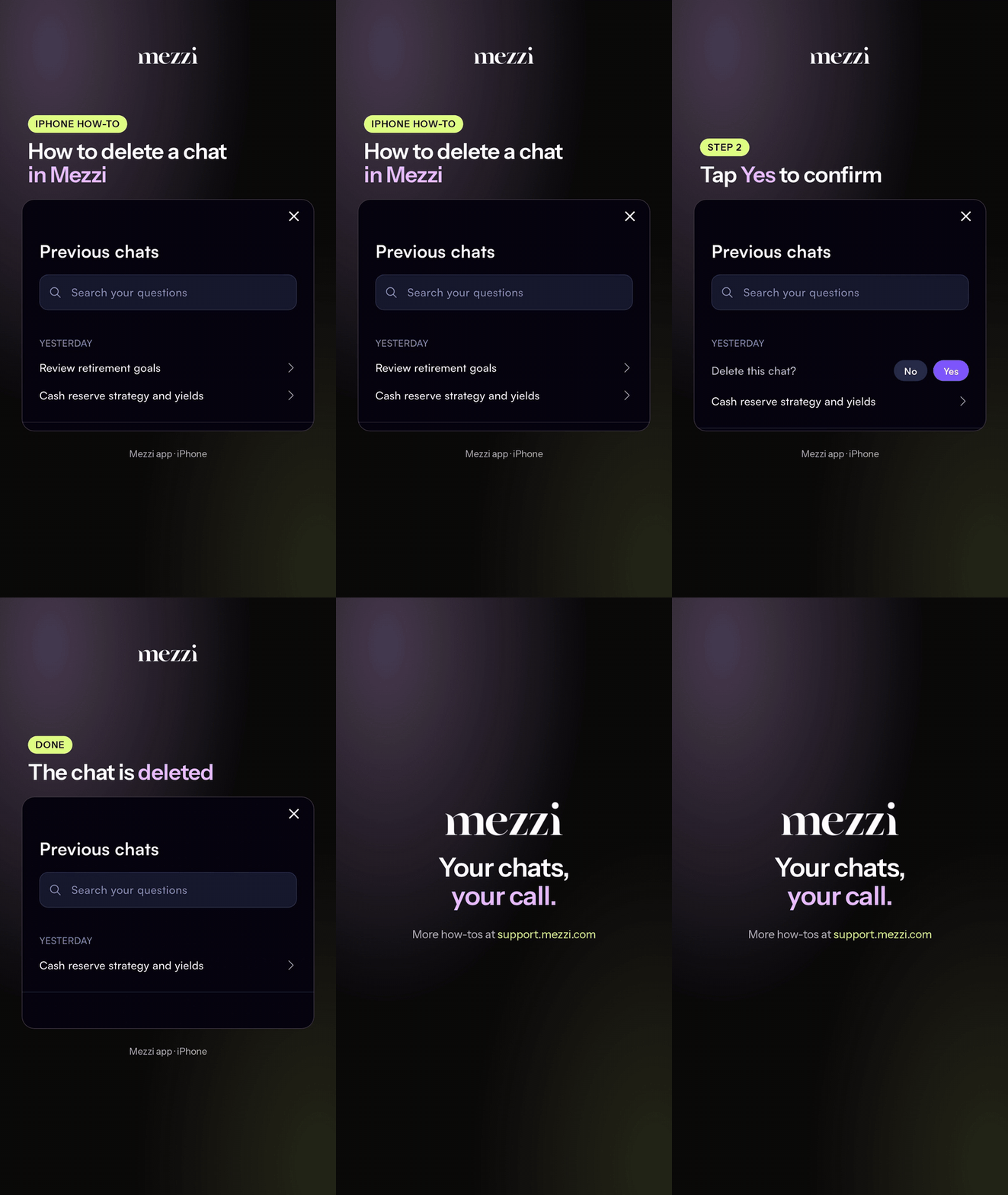
Open Previous Chats in the AI Chat section.
Swipe left on the chat you want to remove.
Tap Yes to confirm the deletion.
Repeat these steps for each conversation you'd like to delete.
💡 Why This Matters
Clearing out outdated or inaccurate AI conversations helps keep your chat history clean and relevant. If the AI previously gave inconsistent responses before you refined your personalization rules, removing those chats ensures your history reflects only the interactions that are meaningful and useful to you going forward.
Important Notes
Chats can only be deleted one at a time. There is currently no option to delete all conversations at once.
Deleted chats are permanently removed and cannot be recovered.
Deleting a chat does not affect your AI personalization rules or settings.
🗨 Still Need Help?
If you're having trouble deleting a chat or the conversation isn't disappearing after following the steps above, reach out to our support team at help@mezzi.com and include:
A description of what happens when you try to delete the chat
The device and operating system you're using
A screenshot of the issue, if possible
Common Questions
Can I delete all my AI chat history at once?
Not currently. Chats must be deleted one at a time by swiping left on each conversation in Previous Chats and confirming the deletion.Will deleting my chat history affect my AI personalization settings?
No. Deleting conversations only removes the chat history. Your AI personalization rules and preferences remain intact and will continue to guide future AI responses.Can I recover a chat after I've deleted it?
No. Once a chat is deleted and confirmed, it is permanently removed and cannot be restored. Make sure you want to delete a conversation before confirming.