How to Set a Proxy for a Holding Using AI Chat in Mezzi
Last updated: October 29, 2026
Overview
When Mezzi can't see inside a holding, such as a 401(k) collective trust, a stable value fund, a 529 portfolio or another plan-only fund without a public ticker, you can ask Advisor in chat to assign it a proxy: a public fund that stands in for it. Mezzi shows the change in a review card first, and nothing is saved until you select Save. Once saved, your asset allocation and X-Ray use the proxy's breakdown for that holding.
🧭 How to Set a Proxy for a Holding (iOS)
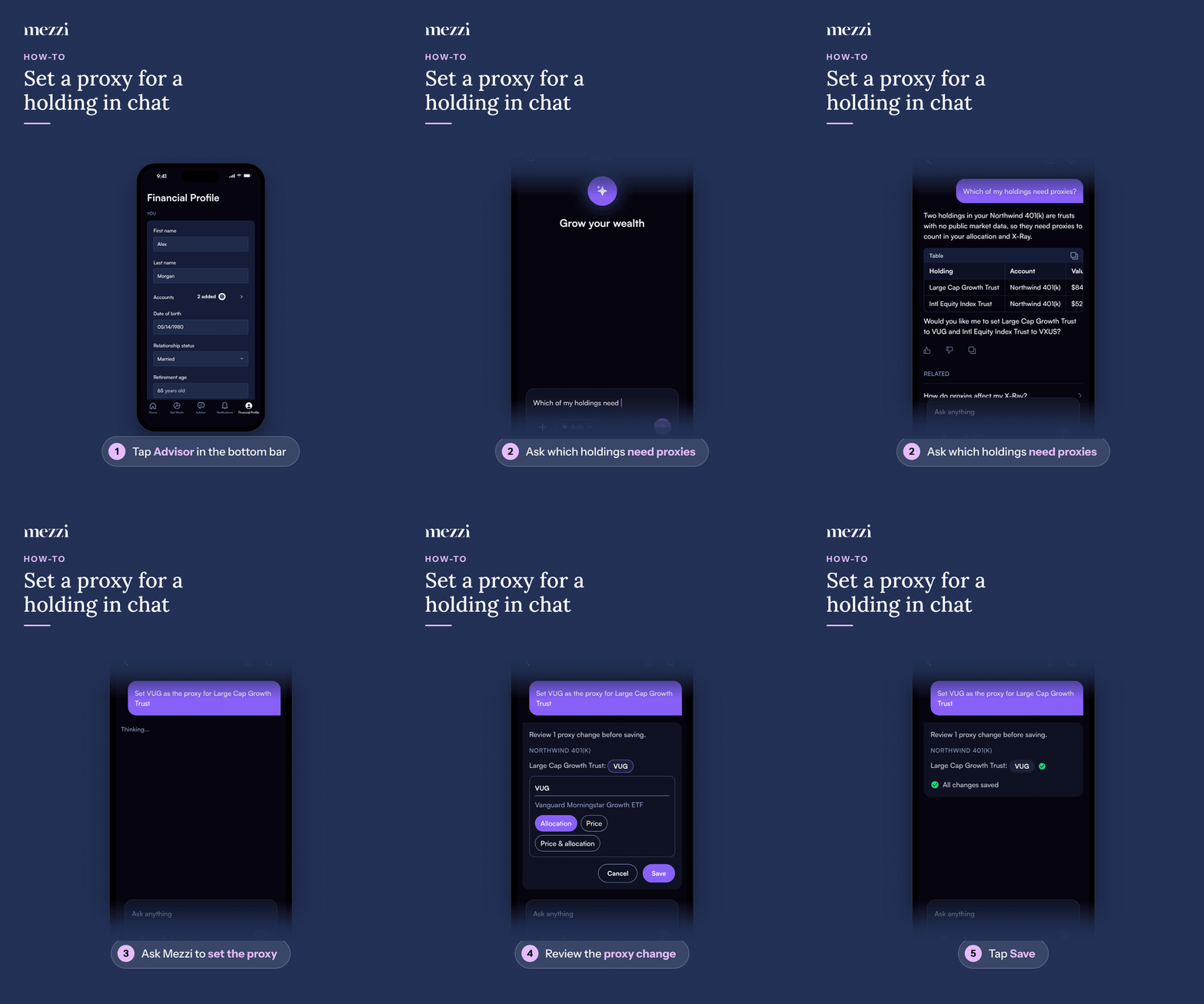
Tap Advisor in the bottom bar.
Ask which of your holdings need proxies, for example "Which of my holdings need proxies?" Mezzi lists the holdings it can't look inside, with a suggested proxy for each.
Ask Mezzi to set the proxy, for example "Set VUG as the proxy for Large Cap Growth Trust" or "Set all of them".
Review the proxy change. The card shows each account, the holding and the proposed ticker. To use a different fund, tap the ticker, type a new one and choose Allocation, Price or Price & allocation.
Tap Save.
🧭 How to Set a Proxy for a Holding (web)
Click Home in the left menu and type in the What's on your mind today? box. On other pages, you can use the Advisor panel on the right instead.
Ask which of your holdings need proxies, for example "Which of my holdings need proxies?" Mezzi lists the holdings it can't look inside, with a suggested proxy for each.
Ask Mezzi to set the proxy, for example "Set VUG as the proxy for Large Cap Growth Trust" or "Set all of them".
Review the proxy change. The card shows each account, the holding and the proposed ticker. To use a different fund, click the ticker, type a new one and choose Allocation, Price or Price & allocation.
Click Save.
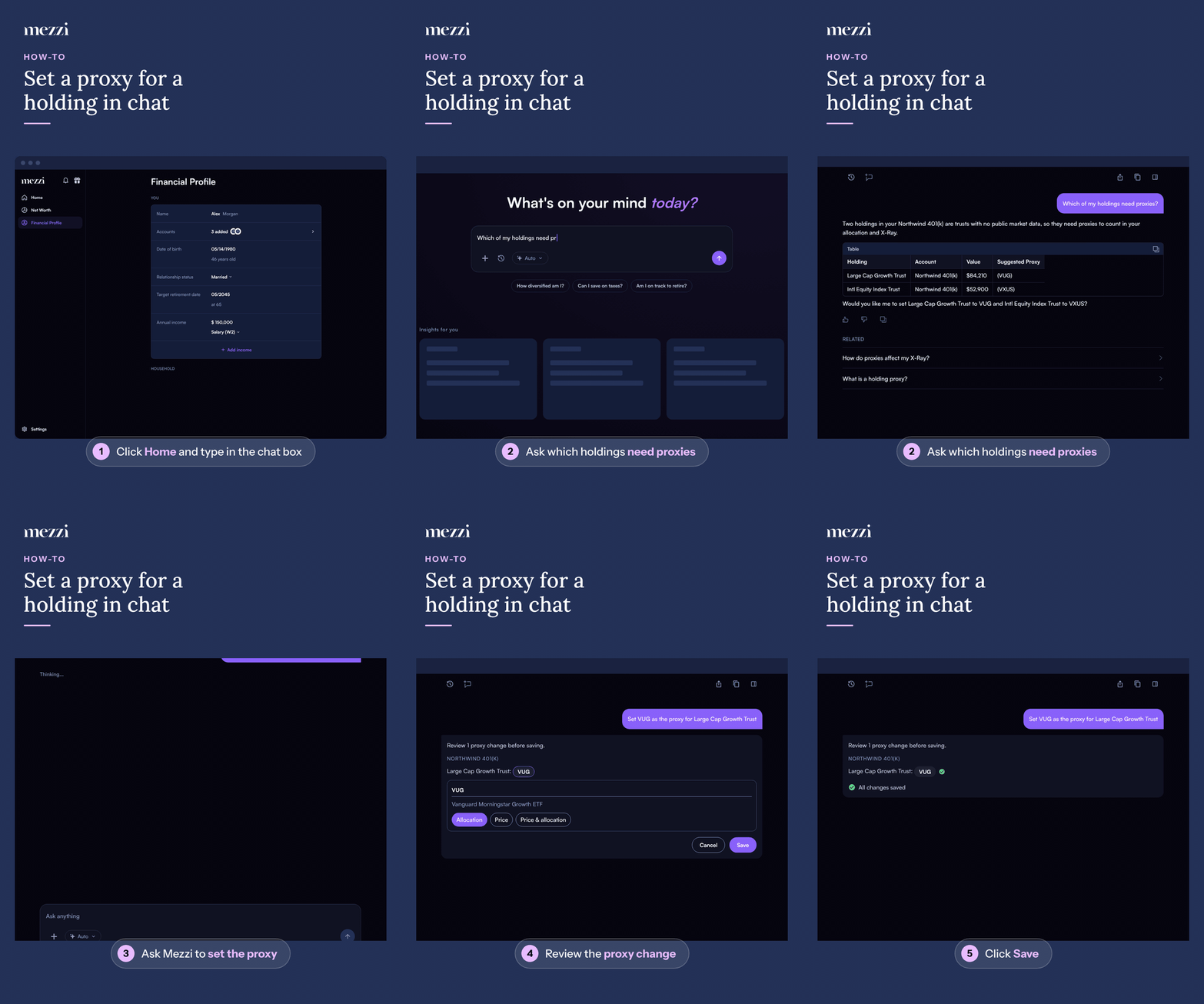
Once you save, each holding gets a green check and the card shows All changes saved. Mezzi then refreshes your portfolio and X-Ray so your allocation reflects the proxy. If you select Cancel instead, nothing changes.
💡 Why This Matters
Funds that only exist inside an employer plan often show up as Remaining funds in X-Ray (see Why Do Some of My Funds Show as "Remaining Funds" in Exposure X-ray?), which leaves a gap in your asset allocation and sector weights. A proxy with a similar strategy fills that gap. The three options control what the proxy is used for:
Allocation (the default): Mezzi uses the proxy's asset class and sector breakdown for allocation and X-Ray. Your holding's balance doesn't change. This is the right choice for most 401(k) and 529 funds, because your institution already reports the correct balance.
Price: Mezzi values the holding using the proxy's price, which changes its balance in Mezzi. Use this only when the holding has no reliable price of its own. The card shows the value before and after.
Price & allocation: both of the above.
Pick a proxy that tracks the same kind of investment, for example an S&P 500 index fund for a large-cap index trust, or a target-date fund with the same year for a target-date trust. If you're not sure, ask Mezzi to suggest one before you save.
Important Notes
Changing or removing a proxy: select a saved ticker in an earlier proxy card and choose Change or Remove, or ask in chat, for example "Remove the proxy on my Large Cap Growth Trust". Mezzi shows a new review card before anything changes.
Several holdings at once: the card can list more than one holding. To leave one out, select its ticker and uncheck Include before you save.
If Mezzi can't set a proxy for a holding, the card says so in a Left out line with the reason.
A proxy is an approximation of the fund's holdings, not an exact match, so your allocation can differ slightly from the plan's own fact sheet.
🗨 Still Need Help?
If a holding still shows as unclassified after you save a proxy, or you'd like help choosing one, email help@mezzi.com or text/call (415) 763-6997 with the holding name and the account it's in, and we'll take a look.