How to Switch Between Positions and X-Ray in All Holdings
Last updated: September 24, 2026
Overview
The All holdings screen has two views, and you switch between them with the Positions / X-Ray toggle at the top of the screen. Positions, the default, lists what you actually own. Each ETF and mutual fund appears as a single line, combined across all your accounts. X-Ray looks inside your funds and shows the individual stocks and bonds you own through them. Switching views changes only how your holdings are grouped. Your balances stay the same.
🧭 How to Switch Views
On the Diversification X-ray card, switch the toggle to Holdings.
Tap See all holdings at the bottom of the card.
The All holdings screen opens in Positions, with your funds, ETFs, and individual stocks each on one line.
Tap X-Ray in the toggle at the top right to see your funds broken out into their underlying holdings. On a phone, the toggle sits just below the title.
Tap Positions to switch back.
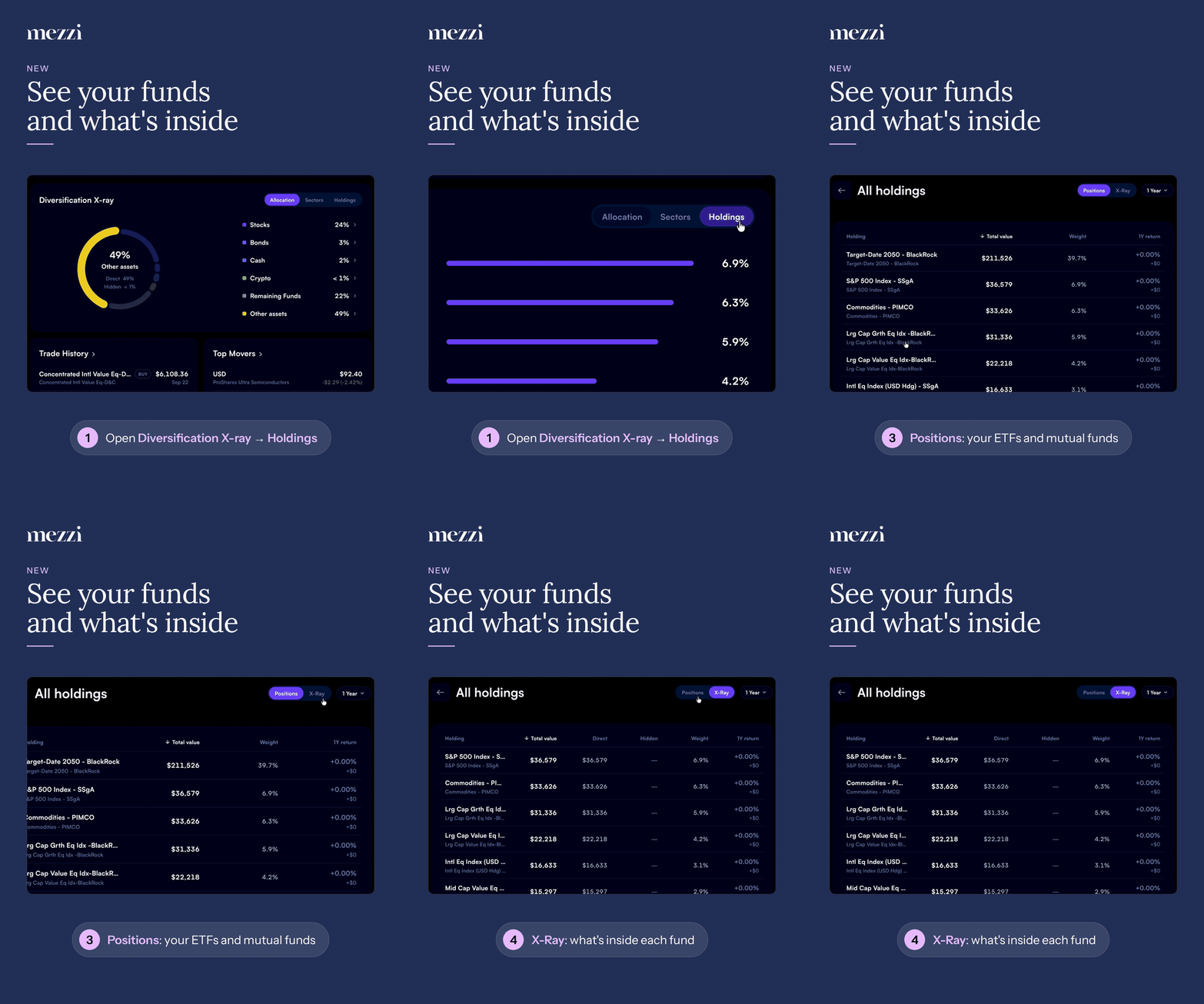
The return-period dropdown next to the toggle (for example, 1 Year) applies to both views, so you can compare returns without resetting it.
💡 Why This Matters
Use Positions to see what you hold and how each fund is doing
If your portfolio is mostly funds, Positions is the view that matches your brokerage statement. It shows how much VOO or QQQ you own across all your accounts, and how each fund has performed over the period you choose. If you can't find a fund in a category view, check here. For example, a crypto ETF may not appear under Crypto, but it will always appear in Positions.
Use X-Ray to find exposure you didn't know you had
X-Ray shows how much of a single company you really own. Say you hold Apple directly and also own an S&P 500 fund. X-Ray adds the two together, so you see your full Apple exposure instead of two separate pieces. To see which of your funds a holding comes from, tap it for the full breakdown.
A practical way to use the two views together:
Start in X-Ray to spot a concentration, such as a large combined position in one tech stock.
Switch to Positions to see which funds are contributing to it.
Important Notes
X-Ray analysis covers the top 50 holdings of each fund. For broad funds holding thousands of securities, the smallest positions aren't broken out individually.
Some funds can't be looked through. Proprietary funds in employer retirement plans often have no public ticker or published holdings. These show as a single line in both views. See Why Your Retirement Plan Holdings Show as Unknown or Have No Ticker. Support can sometimes assign a proxy fund so these are included in X-Ray.
The screen always opens in Positions. If you want X-Ray, switch to it each time you open the screen.
🗨 Still Need Help?
Email help@mezzi.com and include:
A screenshot of All holdings in both Positions and X-Ray
The ticker of the fund or stock that looks wrong or is missing
The name of the account it's held in