How to Connect a 529 College Savings Plan
Last updated: October 29, 2026
Overview
Mezzi supports 529 college savings plans, but coverage is plan by plan rather than universal. Search for the plan's own name ("College Savings Iowa," "Missouri MOST 529 Education Plan") or, if that returns nothing, the program manager named on your statement. Once connected, the 529 balance counts toward your net worth like any other account. Some 529 plans hold a connection poorly or show their balance as cash, and for those, adding the account manually is the right answer.
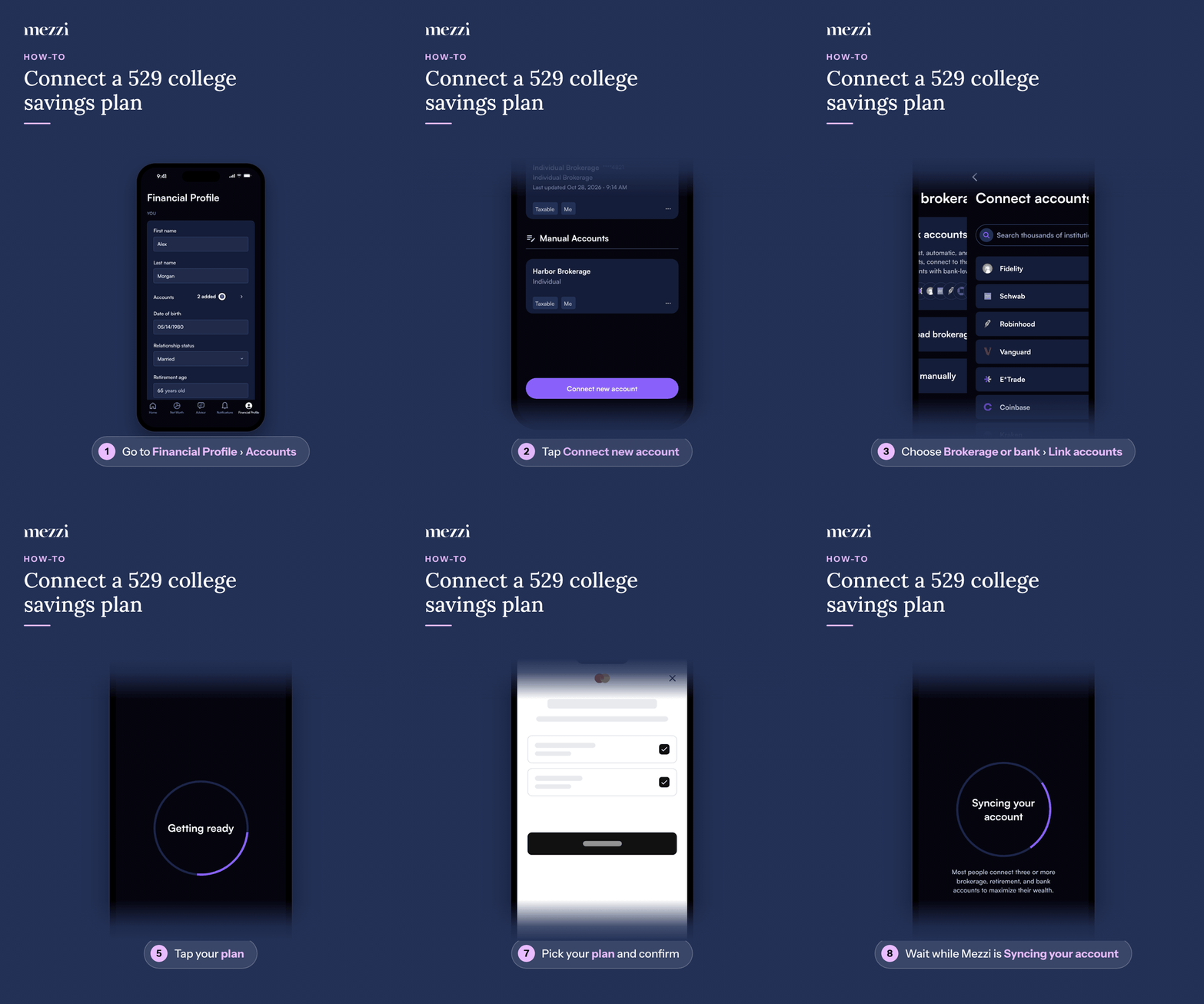
🧭 How to Connect a 529 Plan (iOS)
Before you start, find the plan's exact name. It's on your statement and on the site you log in at. State 529 programs have formal names, such as "College Savings Iowa" or "Missouri MOST 529 Education Plan," and those are what appear in search, not "529" on its own.
Tap Financial Profile, the last tab in the bottom bar, then tap Accounts in the You section. If you haven't added any accounts yet, this opens the add-account options directly, so skip to step 3.
Tap Connect new account at the bottom of Add or edit accounts.
Choose Brokerage or bank, then Link accounts.
Search for the plan's name in Search thousands of institutions. If nothing comes back, search for the program manager instead (see below).
Tap your plan in the results.
Sign in with your plan login.
Pick your plan and confirm.
Wait while Mezzi shows Syncing your account as the data loads.
🧭 How to Connect a 529 Plan (web)
Before you start, find the plan's exact name. It's on your statement and on the site you log in at. State 529 programs have formal names, such as "College Savings Iowa" or "Missouri MOST 529 Education Plan," and those are what appear in search, not "529" on its own.
Click Financial Profile in the left menu, then click Accounts in the You section. If you haven't added any accounts yet, this opens the add-account options directly, so skip to step 3.
Click Connect new account at the bottom of Add or edit accounts.
Choose Brokerage or bank, then Link accounts.
Search for the plan's name in Search thousands of institutions. If nothing comes back, search for the program manager instead (see below).
Click your plan in the results.
Sign in with your plan login.
Pick your plan and confirm.
Wait while Mezzi shows Syncing your account as the data loads.
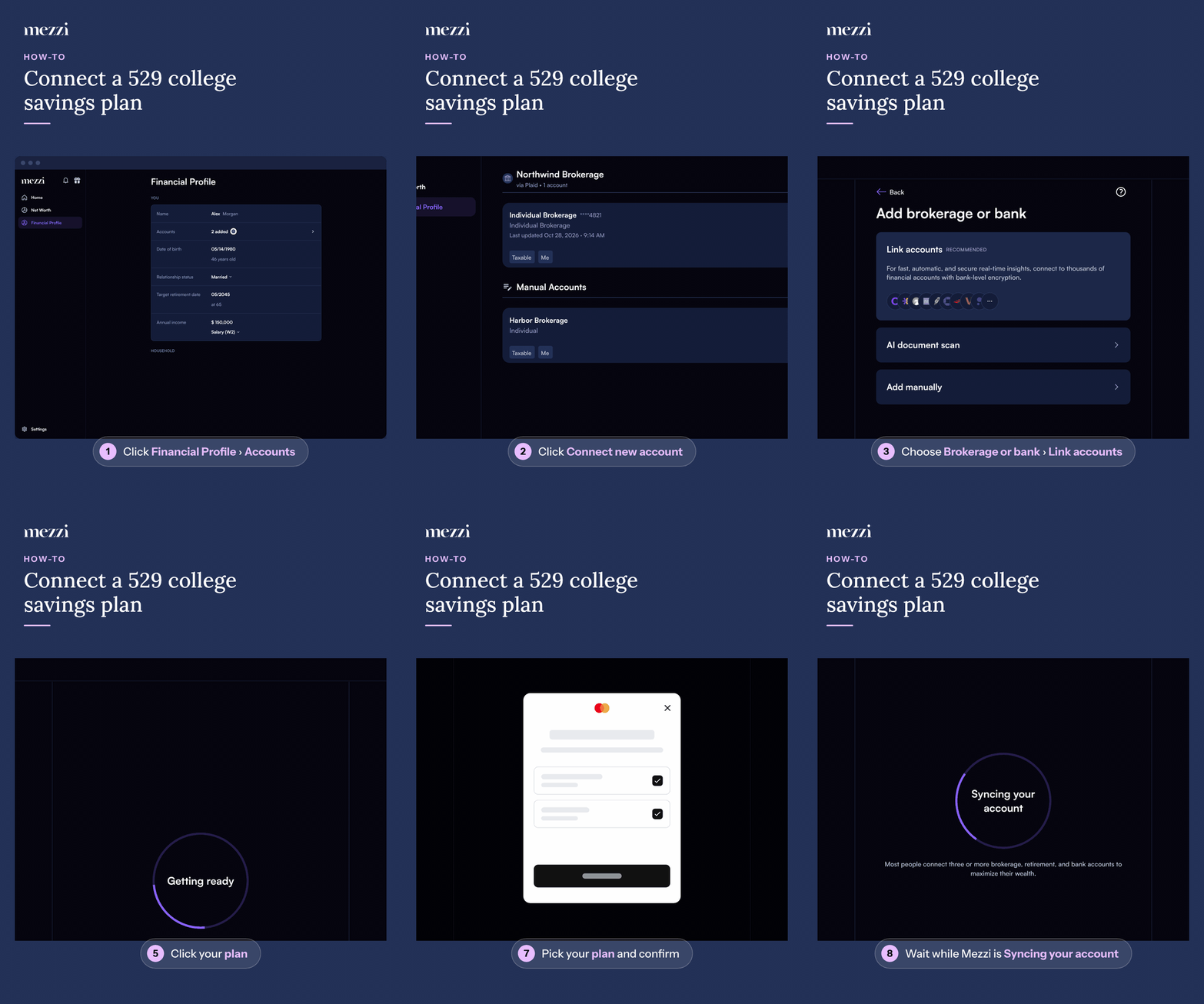
Shortcut: in the left menu, hover over Net Worth and click the + (Add account) next to it, then continue from step 3.
If the plan's name returns nothing, search for the program manager instead. Many state 529 plans are administered by a national firm, the same relationship as an employer plan and its recordkeeper. The manager's name is on your statement. If you still see "No institutions found. Try a different search term," see What to Do When Your Institution Isn't Listed.
Once it's connected, check the balance against your statement. 529 holdings are often age-based or static portfolio options rather than publicly traded funds, so the account total is the number to verify first.
💡 Why This Matters
A 529 is usually earmarked money. It's not retirement, and for most families it isn't discretionary either. Having it inside Mezzi keeps net worth honest without letting education savings quietly distort your retirement or risk picture, since it sits alongside everything else rather than being ignored.
What to expect by plan
College Savings Iowa: supported. It routes through Meld rather than Plaid; you don't need to choose that, just pick the College Savings Iowa entry in search.
Missouri MOST 529 Education Plan: connects, but has been dropping its connection after a day or two and asking to be repaired again. We have this open with the provider. If you hold this plan and the repair prompt keeps returning, don't keep reconnecting. Tell us, and add the account manually in the meantime.
Bright Start (Illinois): connects, but the connected account shows everything as cash, which is a known limitation with some 529 plans. If you've also added the same plan manually, the balance is counted twice. See "Why is my 529 balance doubled?" below.
Other state plans: support depends on whether our providers cover that specific program. If the plan name returns nothing in search, try the program manager, then fall back to manual.
Important Notes
Holdings inside a 529 often can't be priced. Age-based portfolios and plan-specific investment options usually arrive without a public ticker, so they may not break down in Exposure X-Ray and may not produce dividend estimates. The balance is still correct. If you want the underlying exposure reflected, email help@mezzi.com with the portfolio names from your statement and we'll map them to comparable public securities where we can.
Manual is a fully supported fallback. A manually added 529 counts toward your net worth and appears in your accounts list. You update the balance when you check your statement. See How to Manually Add an Account in Mezzi and, if you want holdings on it, How to Edit Holdings for Manually Added Accounts in Mezzi.
Don't delete the connected account until the manual one is confirmed. Deleting a connected account removes it from Mezzi entirely and it can't be restored. Check in your accounts list which account is the manual one before you remove anything, then keep the one that shows your real holdings.
Repeated repairs are worth reporting. A plan that needs repairing every couple of days is an integration problem on the provider's side, not something you're doing wrong.
Common Questions
Does Mezzi support every 529 plan? No. Coverage depends on our data providers, and it varies by state program. If your plan isn't in search, add it manually; it still counts toward your net worth.
Should I search for my state or the plan name? The plan name. "College Savings Iowa" and "Missouri MOST 529 Education Plan" are how the programs are indexed; a state name alone usually returns nothing useful.
Why does my 529 keep asking me to repair the connection? Some 529 integrations lapse after a day or two. That's an upstream issue. Report it rather than reconnecting repeatedly, and use a manual account in the meantime.
Why don't my 529 holdings show up in Exposure X-Ray? Age-based and plan-specific portfolios usually arrive without public tickers, so there's nothing to break down. Send us the portfolio names and we'll map what we can.
Why is my 529 balance doubled? The same plan is in Mezzi twice, once connected and once added manually, so both balances are counted. Keep the manually added account, which shows your actual holdings, and remove the connected one. Email us if you'd like us to remove it for you.
Why does my connected 529 show as all cash? This is a known limitation with some 529 plans: the connection brings in the balance but not the holdings. Add the plan manually if you want holdings on it.
Can I split one 529 balance between two children? No. Mezzi can't split one account's balance between two people. Add each child's account on its own.
My two children's 529 accounts use the same login. How do I add them separately? Download a statement for each child's account, then in Mezzi choose Connect new account > Brokerage or bank and upload one statement at a time: on iOS, tap Upload brokerage statement; on web, click AI document scan. Each one shows up as its own account.
Do manually added 529 accounts update on their own? No. Upload a new statement or edit the balance when you want it refreshed.
🗨 Still Need Help?
Email help@mezzi.com or text/call (415) 763-6997 with:
the full name of the 529 plan and the web address you log in at
what you typed into institution search and what came back
a screenshot of any error or repair prompt, and how often it reappears
the portfolio or investment option names from your statement, if the balance connected but holdings look wrong