How to Connect Your Fidelity Account to Mezzi
Last updated: October 30, 2026
Overview
To connect Fidelity, open the add-account flow, choose Brokerage or bank, then Link accounts, and search for "Fidelity." Pick the result named Fidelity with fidelity.com under it; the Fidelity Bank results are separate banks, not Fidelity Investments. Fidelity connects through Mezzi's SnapTrade integration rather than Plaid, which is why the setup looks a little different from connecting a bank account.
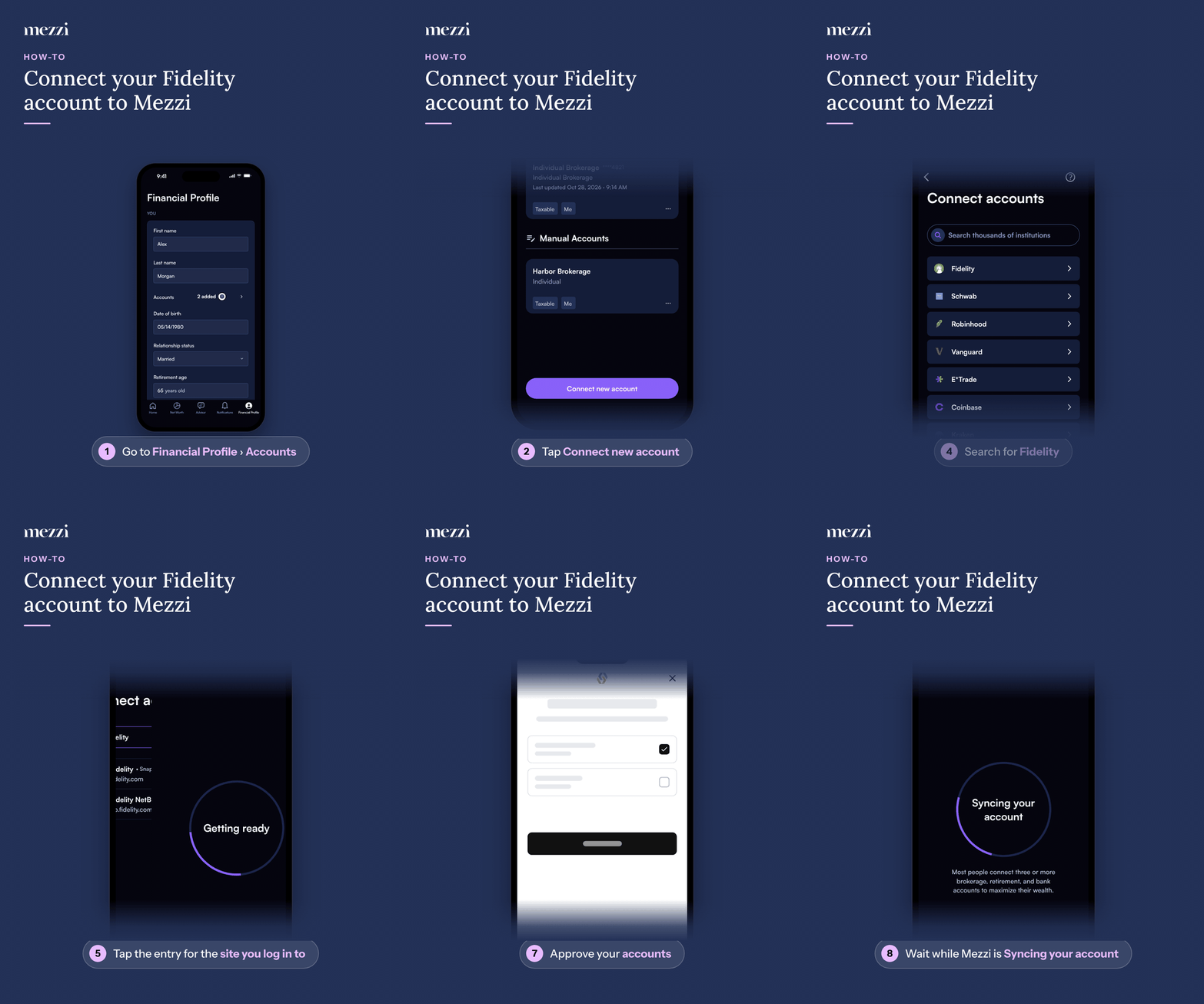
🧭 How to Connect Fidelity (iOS)
Tap Financial Profile, the last tab in the bottom bar, then tap Accounts in the You section. If you haven't added any accounts yet, this opens the add-account options directly, so skip to step 3.
Tap Connect new account at the bottom of Add or edit accounts.
Choose Brokerage or bank, then Link accounts (the card marked RECOMMENDED).
Search for "Fidelity" in Search thousands of institutions. Results show the provider after the name, for example Fidelity • SnapTrade.
Tap Fidelity with fidelity.com under it. Skip the Fidelity Bank results; those are separate banks.
Sign in with your Fidelity login when prompted. Mezzi does not store your Fidelity password; the connection is handled through Fidelity's own secure login.
Approve the accounts you want Mezzi to see.
Wait while Mezzi shows Syncing your account for the initial sync.
🧭 How to Connect Fidelity (web)
Click Net Worth in the left menu.
Hover over Net Worth in the left menu and click the + (Add account) that appears next to it.
Choose Brokerage or bank, then Link accounts (the card marked RECOMMENDED).
Search for "Fidelity" in Search thousands of institutions. Results show the provider after the name, for example Fidelity • SnapTrade.
Click Fidelity with fidelity.com under it. Skip the Fidelity Bank results; those are separate banks.
Sign in with your Fidelity login when prompted. Mezzi does not store your Fidelity password; the connection is handled through Fidelity's own secure login.
Approve the accounts you want Mezzi to see.
Wait while Mezzi shows Syncing your account for the initial sync.
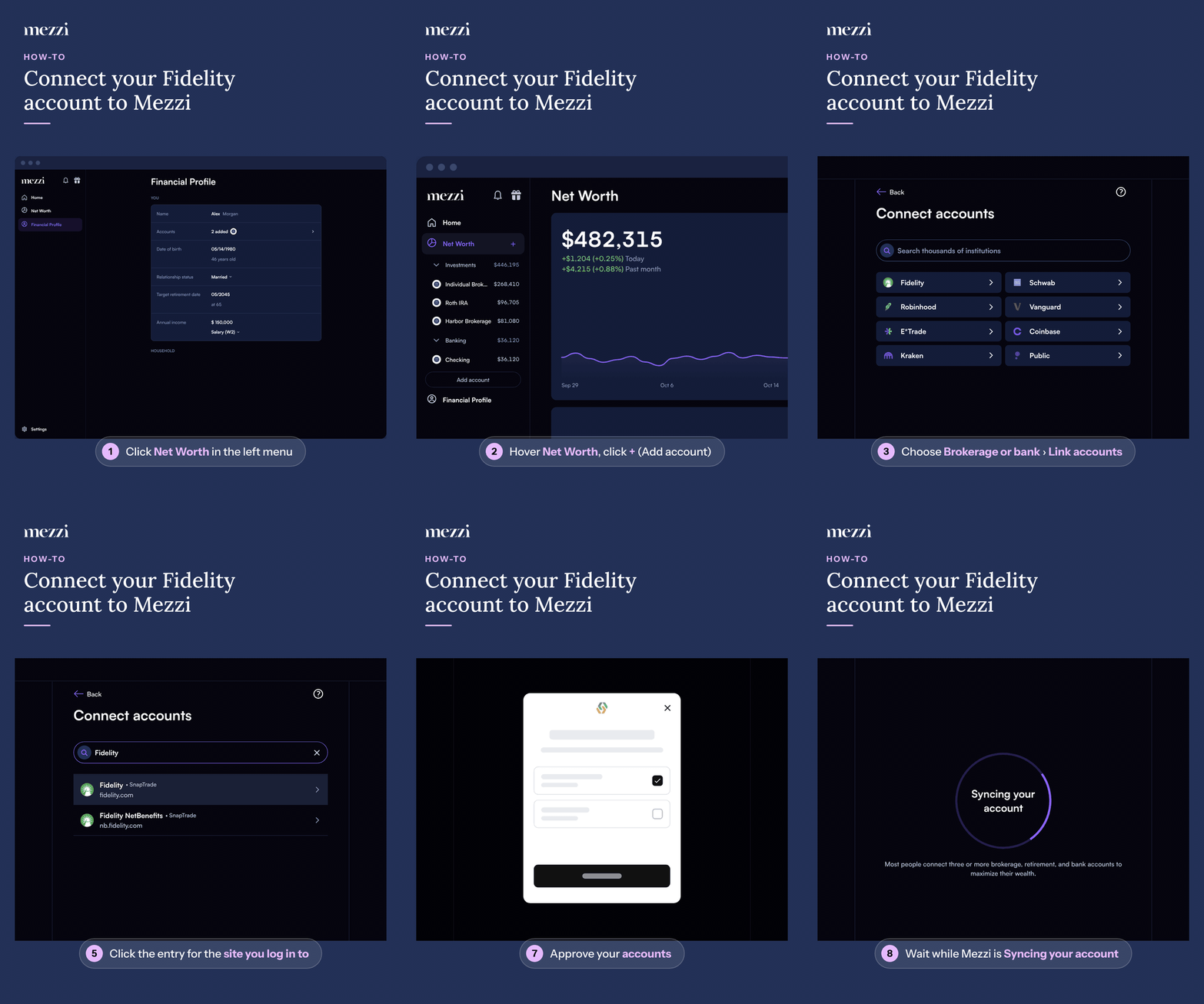
You can also start from Financial Profile > Accounts > Connect new account on web; the rest of the steps are the same.
💡 Why This Matters
Fidelity isn't connected through Plaid. Mezzi routes most institutions through Plaid by default, but Fidelity is one of a handful of exceptions that connect through SnapTrade, one of Mezzi's other data aggregators. This is a deliberate routing choice for Fidelity, not a setting you turn on. Each search result shows its provider after the "•", and when an institution can connect through other providers they're listed under Or connect via; Mezzi's built-in Fidelity entry uses SnapTrade only.
Searching "Fidelity" also shows banks with Fidelity in their name. Those Fidelity Bank listings aren't Fidelity Investments, so connecting one won't find your login. Check the website shown under each result. See My Institution Shows Up More Than Once in Search.
If you have a Fidelity workplace plan (401(k) or 403(b) through NetBenefits), see how to connect your employer retirement account.
Important Notes
If your Fidelity accounts sync but some holdings look wrong (cash showing as a security, duplicate values, or holdings missing entirely), that's a data-accuracy issue, not a failed connection. See Troubleshooting Fidelity Connections.
If Fidelity itself is down for maintenance, Mezzi will surface a connection error even though nothing is wrong on Mezzi's end. Wait and try again before troubleshooting further.
🗨 Still Need Help?
Email help@mezzi.com or text/call (415) 763-6997 with:
Which Fidelity account type you're trying to connect (brokerage, 401(k)/NetBenefits, HSA, etc.)
A screenshot of any error message
Whether the accounts appeared at all, even briefly, after connecting