How to Delete Your Mezzi Account and Data
Last updated: October 30, 2026
Overview
You can delete your Mezzi account and data from inside the app, under Settings › ACCOUNT › Delete my account and data. Deleting removes your connected accounts, their connections, your holdings, your transaction history and your app settings. It is permanent and cannot be undone. There is no restore window and no way for support to bring the data back. If you have an active paid membership, you'll need to cancel it before you can delete your account.
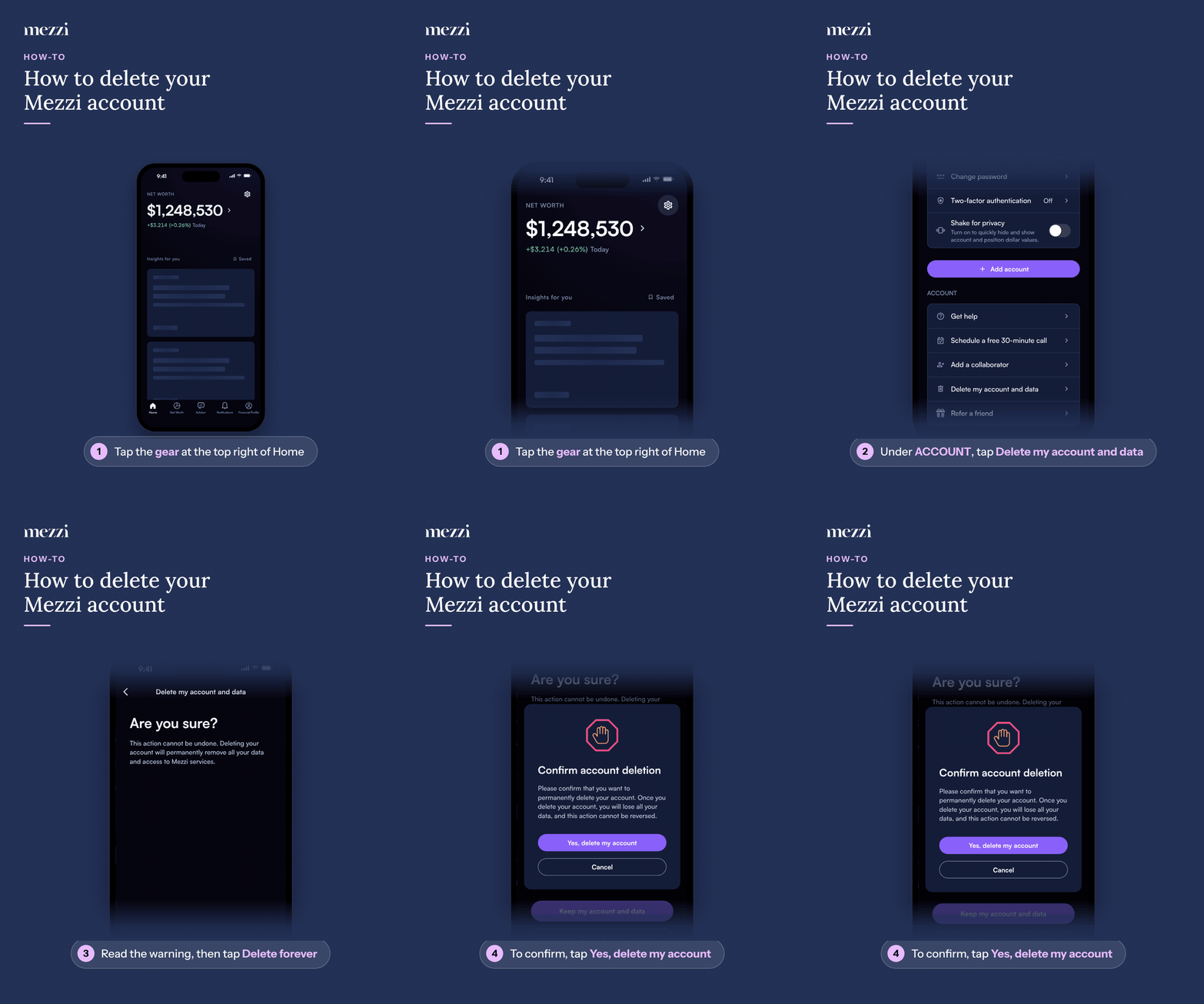
🧭 How to Delete Your Account (iOS)
Tap the gear at the top right of Home to open Settings.
Under ACCOUNT, tap Delete my account and data.
Read the warning on the Are you sure? screen, then tap Delete forever.
In Confirm account deletion, tap Yes, delete my account.
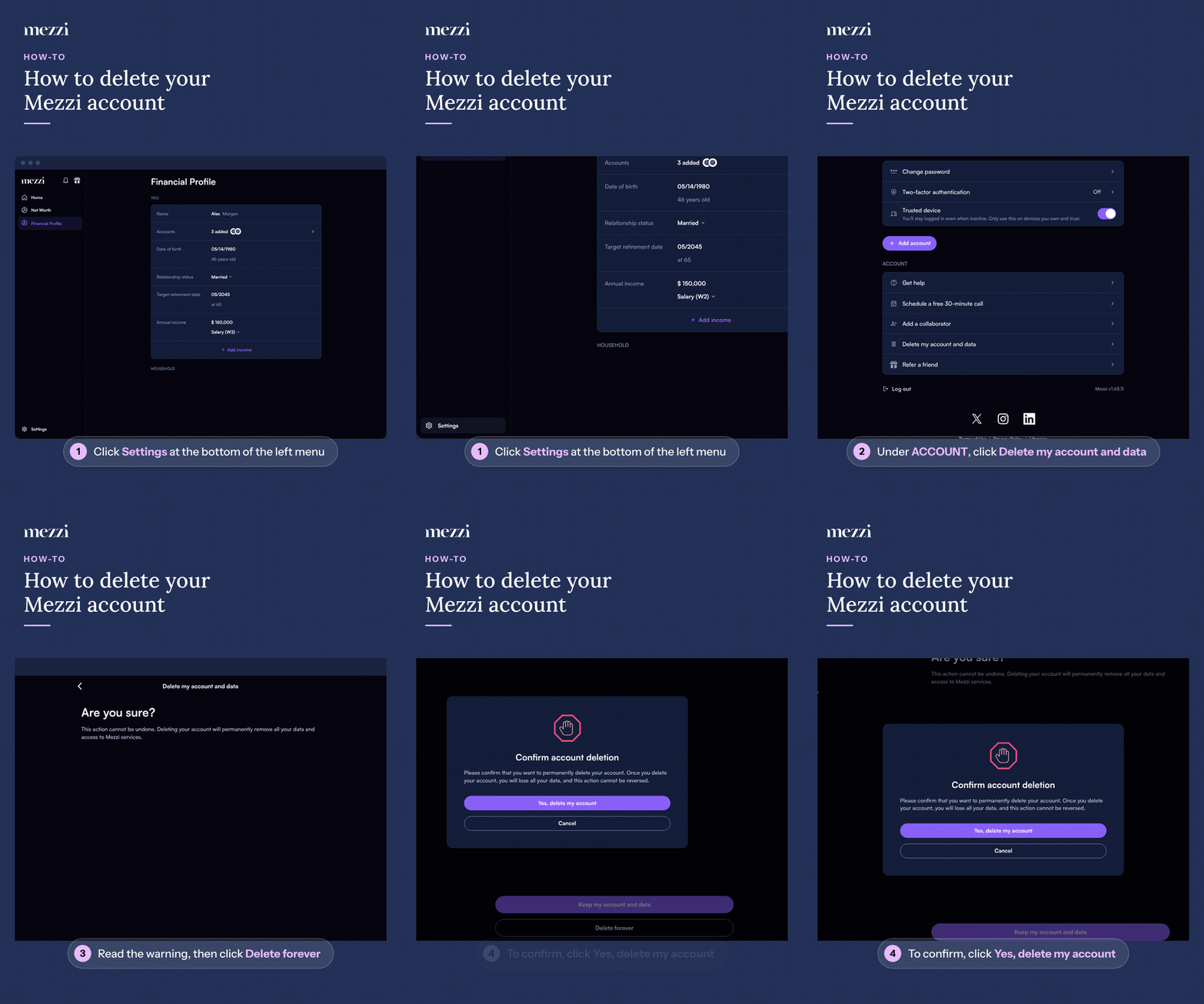
🧭 How to Delete Your Account (web)
Click Settings at the bottom of the left menu.
Under ACCOUNT, click Delete my account and data.
Read the warning on the Are you sure? screen, then click Delete forever.
In Confirm account deletion, click Yes, delete my account.
Mezzi then asks you to confirm it's you: enter your password if you sign in with email, or sign in again with Google or Apple. Once you confirm, deletion runs on Mezzi's side. If it doesn't complete for you, don't repeat it several times. Email help@mezzi.com and we'll process the deletion manually.
📌 What Deletion Removes
Deleting your account removes, permanently:
Your connected accounts: every brokerage, bank, retirement, crypto and manually added account in your net worth.
Your connections themselves: the read-only links to Plaid, Finicity, SnapTrade, Meld and Mesh are removed, so no further data is pulled from your institutions.
Your holdings: positions, values and the allocation and exposure data built from them.
Your transactions: the transaction history Mezzi imported.
Your user settings: preferences, personalization and app configuration tied to your profile.
Your money and your assets are unaffected. Mezzi is read-only and is not a custodian, so deleting your Mezzi account changes nothing at your brokerage, bank or plan administrator. See What Mezzi Does — and What It Doesn't.
💡 Before You Delete
Cancel any paid membership first. If you're on a paid plan, Mezzi won't delete your account until the membership is cancelled. You'll see "You can't delete your account until you cancel your active subscription." Cancel it under Settings › YOUR MEMBERSHIP › your plan › Cancel membership, then come back to delete. For more on plans, see Mezzi Membership Plans: Free, Advisory, and Concierge.
There is no export. Mezzi doesn't currently offer a self-serve download of your data, so anything you want to keep, like a screenshot of your allocation or a note of your manual asset values, should be captured before you delete. See Can I Export or Download My Data? for what you can copy out first.
Consider removing one institution instead. If your concern is a single connection rather than the whole account, you can remove that institution and keep everything else. What Happens to Your Data When You Disconnect an Account? covers what that does.
Collaborators lose the shared view. If you've invited a family member, advisor or CPA to collaborate, deleting your account ends their access to your picture along with everything else.
Important Notes
If you have a membership question alongside your deletion request, email help@mezzi.com and we'll handle it with you directly.
If the in-app deletion is blocked or shows an error, email help@mezzi.com and we'll complete the deletion on our side.
🗨 Still Need Help?
Email help@mezzi.com, or text or call (415) 763-6997. Say that you want your account and data deleted, and include the email address on your Mezzi account so we can find it.
Common Questions
Can I undo the deletion or get my data back? No. Deletion is permanent. Once it completes, your accounts, holdings, transactions and settings are gone and cannot be restored by you or by support.
Does deleting my Mezzi account affect my brokerage or bank accounts? No. Mezzi only ever reads your accounts and cannot move money or place trades. Your accounts at your institutions are untouched.
Do I have to disconnect my accounts before deleting? No. Deletion removes the connections along with everything else. Disconnecting first is optional.
Why does it say I can't delete my account? You still have an active paid membership. Cancel it under Settings › YOUR MEMBERSHIP, then try again.
What if the delete option doesn't work? Email help@mezzi.com. We can process the deletion manually.