
How to Add an Investment Mezzi Can't Find or Price
Overview
If Mezzi can't price an investment, you can enter its current price yourself. This works whether the investment doesn't come up in search at all, or comes up but shows "—" or Enter amount instead of a price, which is common with non-US funds, private funds and employer-plan funds. Mezzi then counts it in your net worth at the price you entered, and the value only changes when you update it.
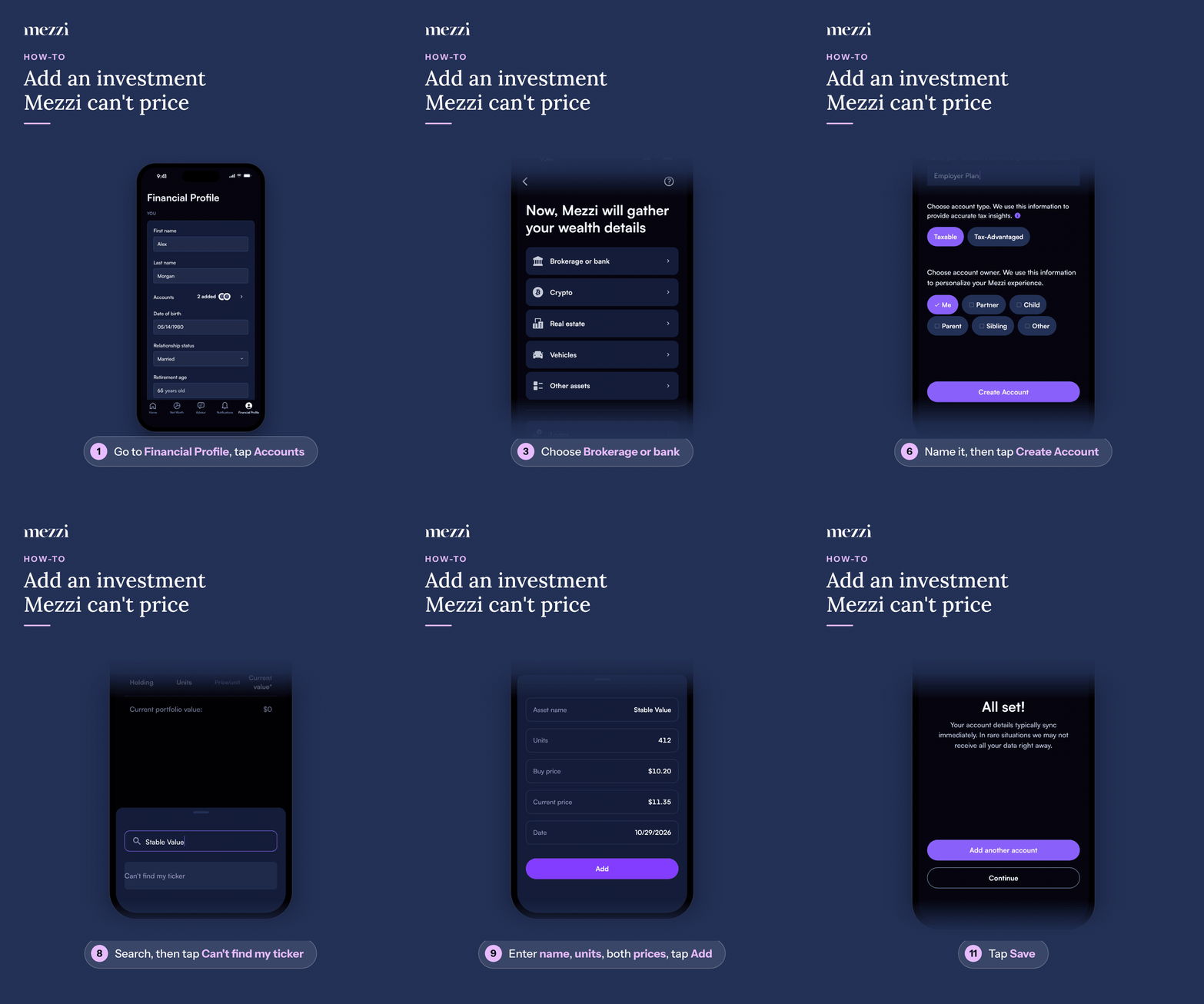
🧭 How to Add an Investment Mezzi Can't Find or Price (iOS)
Tap Financial Profile, the last tab in the bottom bar, then tap Accounts in the YOU section. If you haven't added any accounts yet, this opens the add-account options directly, so skip to step 3.
Tap Connect new account.
Choose Brokerage or bank.
Tap Add manually.
Tap Create new account. To add to a manual account you already have, select it on the Choose account screen instead and skip the next step.
Give the account a name, choose the account type and owner, and tap Create Account.
Tap Add holdings.
Search for the investment by ticker or name. If it doesn't appear, tap Can't find my ticker at the bottom of the list.
Enter the Asset name, the number of Units you hold, your Buy price, and the Current price per share or unit in US dollars, then tap Add. The current price must be greater than $0.
A Manual updates notice explains that Mezzi can't track this investment's price automatically. Tap Got it, or Don't show again to stop seeing it.
Tap Save.
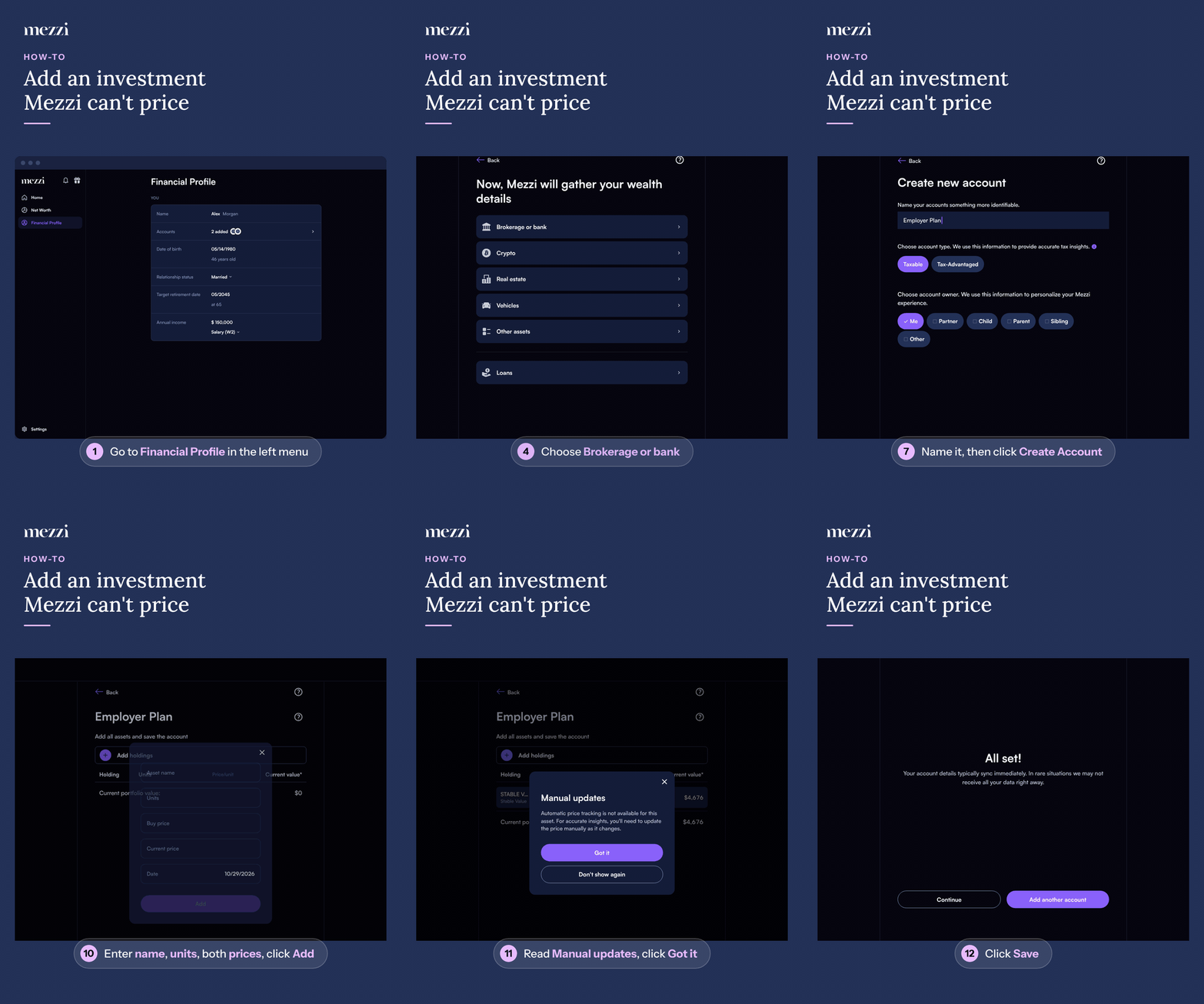
🧭 How to Add an Investment Mezzi Can't Find or Price (web)
Click Financial Profile in the left menu.
Click Accounts in the YOU section. If you haven't added any accounts yet, this opens the add-account options directly, so skip to step 4.
Click Connect new account.
Choose Brokerage or bank.
Click Add manually.
Click Create new account. To add to a manual account you already have, select it on the Choose account screen instead and skip the next step.
Give the account a name, choose the account type and owner, and click Create Account.
Click Add holdings.
Search for the investment by ticker or name. If it doesn't appear, click Can't find my ticker at the bottom of the list.
Enter the Asset name, the number of Units you hold, your Buy price, and the Current price per share or unit in US dollars, then click Add. The current price must be greater than $0.
A Manual updates notice explains that Mezzi can't track this investment's price automatically. Click Got it, or Don't show again to stop seeing it.
Click Save.
Once you save, the investment appears in the account at the value you entered and counts toward your net worth.
If the Investment Appears but Has No Price
If your search finds the investment but it shows "—" or Enter amount instead of a price, Mezzi has no price for it. Select it anyway, enter your units, and enter the current price per share or unit in US dollars when asked. The field starts empty, and the price must be greater than $0.
💡 Why This Matters
Plenty of real holdings have no price feed: non-US funds, employer-plan funds with internal codes, annuities, structured notes, private real estate and venture funds, and private loans. Adding them keeps your net worth and Mezzi AI's advice complete.
Recommended: use a priced ticker when one exists. If the investment has a public ticker that Mezzi prices, add it that way. Mezzi then updates its price automatically and can include it in Exposure X-Ray.
Non-US funds. Mezzi shows everything in US dollars, so convert the fund's price from its local currency before you enter it, and update it when the price or exchange rate moves meaningfully.
Tell Mezzi AI the details. For something like a private loan, add the terms (for example, the interest rate and maturity date) in a note on the asset or in AI personalization so Mezzi AI factors them in.
Important Notes
Prices you enter don't update on their own. Edit the holding when the price or quantity changes.
A holding can't be saved at $0. If an investment is worthless, leave it out or delete it.
Holdings Mezzi can't price appear under Remaining Funds in Exposure X-Ray, and we can't map them to a comparable public fund in manually added accounts yet.
If you own only part of an asset, enter just your share.
🗨 Still Need Help?
Email help@mezzi.com with the investment's name and a recent statement, and we'll help you add it.