How to Add Other Assets in Mezzi (Collectibles, Jewelry, Life Insurance)
Last updated: October 12, 2026
Overview
Use Other assets to add things Mezzi can't connect to, such as collectibles, art, jewelry, precious metals, or the cash value of a life insurance policy. You enter a name, its current value and what it cost, and Mezzi adds it to your net worth. Other assets don't update on their own, so edit the value whenever it changes.
🧭 How to Add an Other Asset
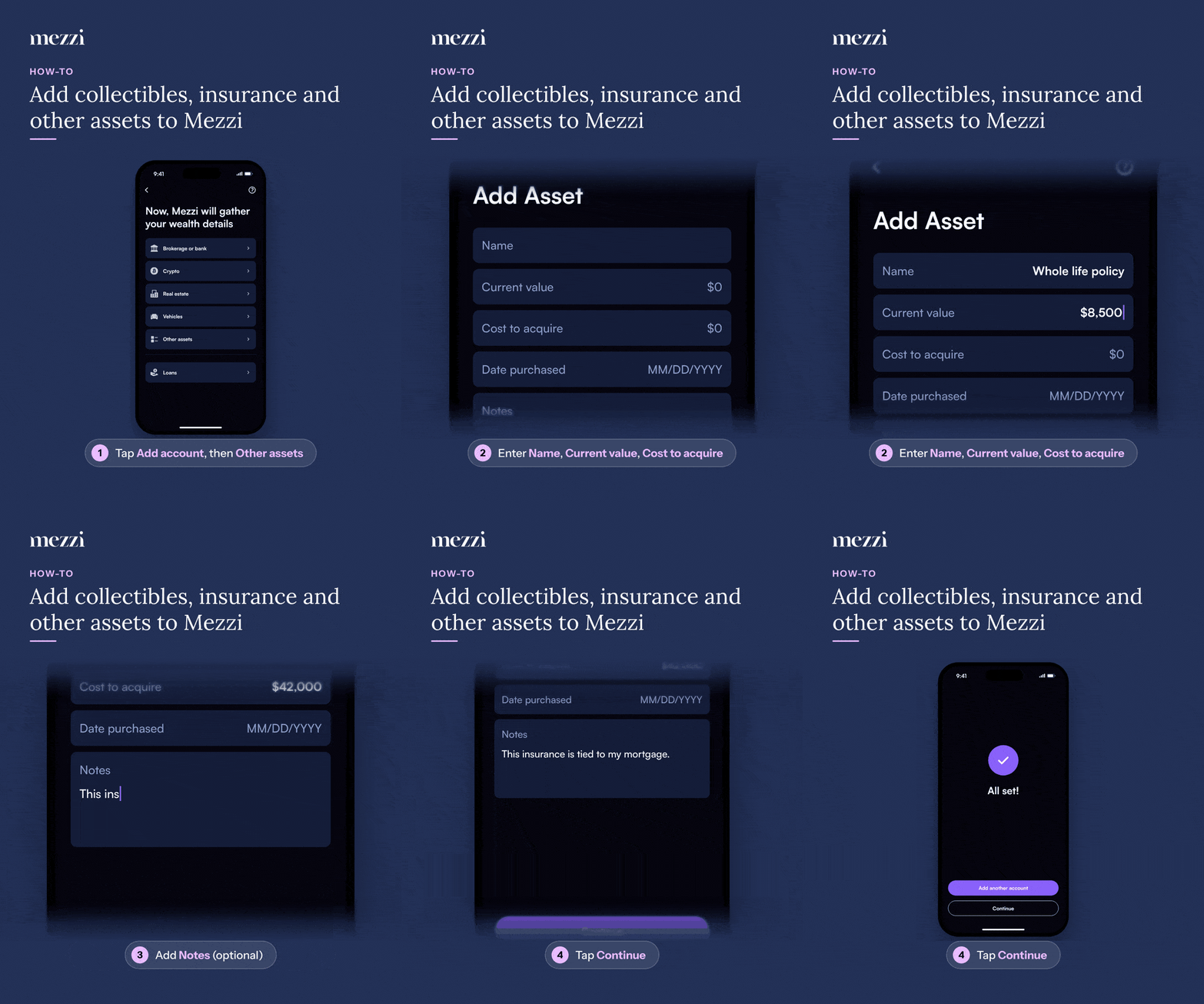
Tap Add account. (On your Accounts page, the button is Connect new account.)
Choose Other assets.
Enter a Name, the Current value, and the Cost to acquire. Date purchased is optional.
Optional: add Notes to give Mezzi AI context, for example "This insurance is tied to my mortgage."
Tap Continue. On the All set! screen, tap Add another account to add more, or Continue to finish.
💡 Why This Matters
Your net worth in Mezzi is only as complete as what's in it. Adding valuables and policies gives Mezzi AI the full picture when it answers questions about your wealth and allocation.
Recommended for life insurance
Enter the policy's cash value as the Current value, and update it when your statement shows a new cash value. Use Notes for details like the insurer, the policy type, or what the policy is tied to. Mezzi AI reads notes when answering your questions, but notes don't change any values.
When to use a different option
Stocks, funds or other investments with a ticker: add them through manual entry or document scan instead, so prices update automatically.
A home or rental property: use Real estate. See this guide.
A car: use Vehicles.
Important Notes
Continue stays greyed out until Name, Current value and Cost to acquire are all filled in.
To update the value or notes: go to Profile → Accounts, find the asset under Manual Accounts (it's labeled Other Asset), tap the three dots (⋯), choose Edit, make your changes, and tap Continue.
To remove it: tap the three dots (⋯) and choose Delete account. See how to delete a manually added asset.
🗨 Still Need Help?
Email help@mezzi.com with the asset's name and a screenshot of what you're seeing, and we'll take a look.